With the release of iOS 4.2 on Monday, there are a lot of new features included, mostly for the Apple iPad. In this series we will highlight a new feature each post and explain how to use it and in some cases how it will change your daily use of the iPad.

AirPrint: What Is It?
AirPrint is the new feature in iOS 4.2 which is supposed to allow users to print from their iPad. This one feature may be the most useful addition to the iPad for users who see the device as a content creation computer instead of just a media consumption appliance. There was some confusion about whether it would be included in the update. However, Steve Jobs later confirmed it would not be pulled.
Below is a video from PC Magazine highlighting both AirPrint and AirPlay:
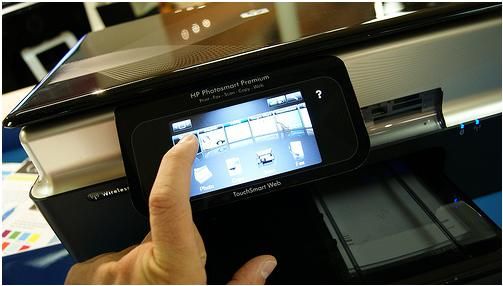
The plan was for iOS 4.2 to print directly to a printer that is networked. However, there is one major requirement which makes it far less useful for most people. The printer must support the feature. At present few printers do. The other way to use a printer with AirPrint is connect it directly to a Mac. This should work. The only other way known to work for sure is to connect the printer to an AirPort Express Base Station. So it sounds like Windows users who don’t have an AirPort Express Base Station or a supported printer will be left out. Supported printers include the HP ePrint printers.
AirPrint: How To Use It?
To use AirPrint your app and hardware will have to support it. There will be a share button somewhere in the application.
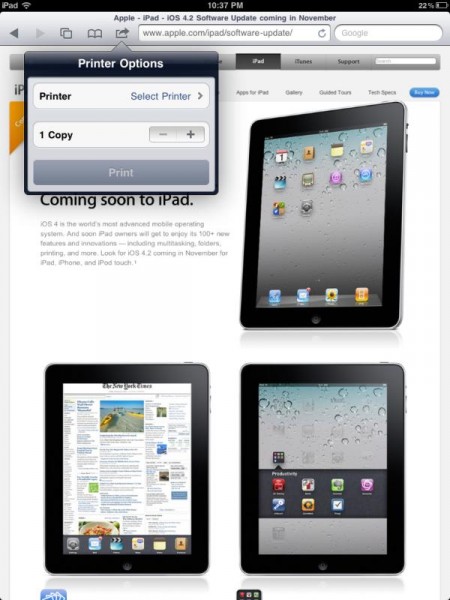
Notice above the little icon that looks like a box with a curved arrow pointing to the right on the toolbar. Look for that icon and it will bring up the print box. Select the supported printer and tell it how many copies to print or leave it alone for just one. Hit the print button and it should work.
As for hardware, get an HP ePrint printer or hook your printer up to your Mac or AirPort Express Base Station. Once the printer is configured and working then you are ready to print from the iPad.
Two built-in apps that work are Safari and the Photos app in iOS. From within Safari there will be the button seen in the image above. Surf to a page you want to print and hit the share button and select the printer and hit print. From Photos find the picture you wish to print. The share button will also be present in the upper right corner.
Other apps may hid the feature somewhere else. And the iWork suite of apps that run on the iPad will also be able to print.
Related Posts
-

PlayOn.tv is bringing March Madness to your Android device, Roku, Xbox and iOS devices. This…
-
Apple is issuing a recall for its wall plug adapters, after a limited number of…
-
Today, Apple updated its most portable MacBook ever with a spec bump and a press…