Show Battery Percentage on Your iPhone’s Status Bar

| September 2, 2009 | 27 Comments

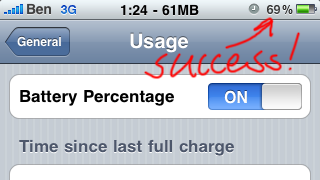
I’m pretty sure that Apple slipped this in with the iPhone OS 3.0 update; there is finally a way to see the exact battery percentage in your iPhone’s status bar, rather than just having to guess from the small battery icon. I swear it seems like the battery icon only reads 25%/50%/75% ok maybe it’s a bit better than that but still having the actually percentage is so much more useful. Enabling it is quite simple:

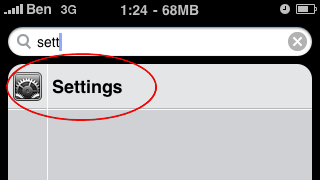
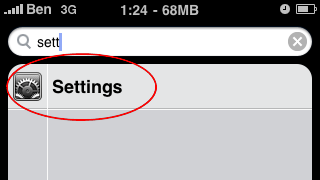
  1. Flick over to the left of your first apps page and search for Settings (or just find the icon itself) and launch it
    IMG_0718

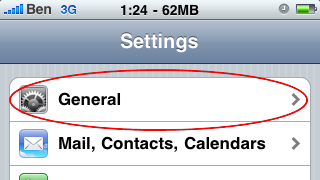
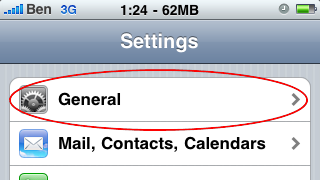
  2. Once Settings loads, scroll down until you find General, click on it
    IMG_0719

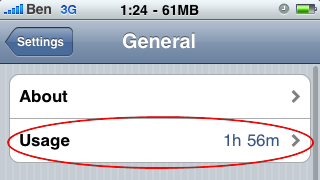
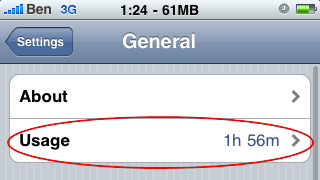
  3. Under general find and go into the Usage section
    IMG_0720

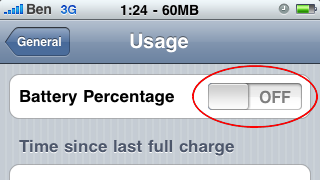
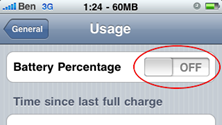
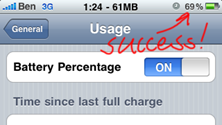
  4. Right at the top there is a little switch next to Battery Percentage, just flip the switch and voila!
    IMG_0721 IMG_0722

Enjoy being able to accurately determine your remaining battery life!

Also, I’m not 100% (bad pun intended) sure if this option is available to iPod Touch users. If you have an iPod Touch why don’t you have a quick look around and let us know in the comments?

Tags: , , , , ,

Category: How To, HowTo

Comments (27)

Trackback URL | Comments RSS Feed

  1. Thalia says:

    Dunno about the Touch, but this feature isn’t available for older iPhones.

  2. Thalia says:

    Dunno about the Touch, but this feature isn’t available for older iPhones.

  3. Thalia says:

    Dunno about the Touch, but this feature isn’t available for older iPhones.

  4. Thalia says:

    Dunno about the Touch, but this feature isn’t available for older iPhones.

  5. Alex says:

    dude this is so fake, all so fake

  6. Alex says:

    dude this is so fake, all so fake

  7. Alex says:

    dude this is so fake, all so fake

  8. Alex says:

    dude this is so fake, all so fake

  9. Carlos says:

    It works only on the iPhone 3GS :(

  10. Carlos says:

    It works only on the iPhone 3GS :(

  11. Carlos says:

    It works only on the iPhone 3GS :(

  12. Carlos says:

    It works only on the iPhone 3GS :(

  13. Sam says:

    I'm currently setting up a 3rd gen 64G iPod Touch for a friend. Having just looked through the settings, I can say that this feature doesn't seem to be available for the Touches. As for Alex's comment about this feature being fake, it's unlikely, since I've enabled it for my own iPhone 3GS.

  14. Guangrui says:

    It's real alright, my girlfriend's iphone showed the percentage and I'm pretty sure that's the real deal. But for the ipod, it ain't avaliable.

  15. Yousef says:

    It works on my iPhone 3GS, Thanks alot

  16. Yousef says:

    It works on my iPhone 3GS, Thanks alot

  17. buck says:

    i have a 3G and my wife has the 3GS, it works on hers but not mine so im also assuming this is unavailable on the 3G

  18. AndrewStarkid says:

    Didnt work on my 3g

  19. Hot_mom_in_socal says:

    It's not on the ipod touch.

Leave a Reply