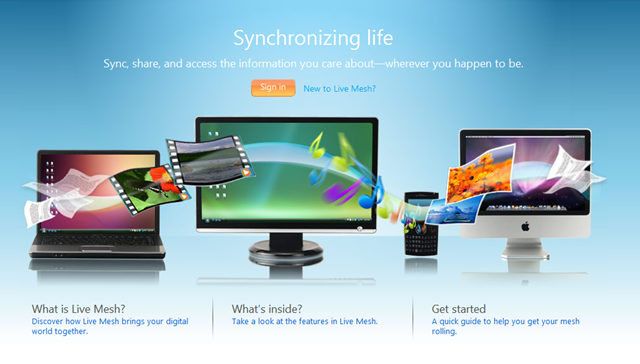
I was a Windows Live Sync Beta user when it first came out (and was originally called FolderShare) back in what now seems like the dark ages. Then I discovered Windows Live Mesh and jumped over to that service because I liked some of its features. Live Sync would look at folders you selected on multiple computers and automatically compared the differences between the folders and mirrored the contents so that all the docs in the folder on PC1  would show up pretty quickly on PC2. Mesh did the same thing but also added online backup for up to 5GB of data. You could log into your Life Mesh desktop and access those files and download them to a computer that did not even have mesh installed.
I would do this to take the slides I had created in Photoshop on my home or office PC, put them in a folder that I was sharing via Mesh so they would upload to the online site and download them onto the PC in our church’s sanctuary. It didn’t have Mesh because I didn’t want all my personal files on it. It is used only to displays our presentations while I preach and record the worship services for Ustream and our CD distribution ministry.
For the first year of use I was happy with just a few exceptions. Mesh didn’t handle my OneNote Notebooks well. Things would get messed up and I often lost whole notebooks. Also it would not sync an Outlook data file (the file with a .PST extension that stores all your Outlook data). It was frustrating but manageable.
For a while the Mesh team would update the software and it got better and better even though it was in beta. I came to rely on it. Then everything seemed to stop. The above weaknesses remained. I kept asking for help in the Mesh forums and I searched for solutions on Google and elsewhere. Nothing! It was like the Mesh team just disappeared and the software was orphaned.
The other problem with Mesh was that it would not sync with their Skydrive service, a cloud storage solution from Microsoft. I would upload files to my Skydrive using Skydrive Explorer, a program you can install on your PC and it treats the online storage as a local disk. It is now called SDExplorer Pro. But Mesh wouldn’t work with Skydrive. This was frustrating and I kept asking if this would ever come and there would be no answer from official sources.
Almost unrelated, I got an iPad. When I did, I began wanting to find a way to easily move files from my computers to the iPad. I used the iTunes import method. But while doable it is not quick and easy. Then I discovered DropBox. And with that discovery I removed Mesh from all of my PCs. Now I put all the files I want to sync in my DropBox. I can access them on my different PCs because the DropBox client syncs them quickly. There are two significant weaknesses in DropBox when compared to the beta version of Mesh. First, Mesh offered 5GB of online data. DropBox gives you only 2GB for free. You can pay for more, but I didn’t want to pay for what I could get for free from Mesh.
The second weakness of DropBox compared to Mesh was the ability to log into a computer and remotely control it. It was very slow but at least it was doable. There are other services that make this possible, but I liked having it all together in one app. But again, I got an iPad. And with my iPad I found LogMeIn Ignition, a $30 app that I previously demonstrated (see above video) It lets you control a PC so long as the PC is running the client software. It is as simple as installing a little app on the computer and the iPad and logging in. It just works and it is amazingly quick even over the Internet.
So, after waiting for improvements to Mesh and after finding DropBox and LogMeIn and the iPad, Mesh became expendable.
Now, Microsoft has finally updated Live Mesh integrating it with Live Sync and Skydrive. And they have created something that I was longing for when I was a user. It is integrated with Skydrive. It syncs your computers. And I understand that it will even sync your Microsoft Office settings and personal files. OneNote notebooks and Outlook files are apparently included. They even are integrating it with Office Web Apps. But I have long since abandoned Outlook for Google’s Apps for my Domain and OneNote because it doesn’t work well with the iPad. I use Evernote for that now. And I just don’t use cloud based office productivity software unless I absolutely have to.
When I learned of the new version of Windows Live Sync with Mesh technology and Skydrive integrated and syncing of notebooks and settings in Office, I was tempted to try it again. Then I realized a couple of things. You only get 2 GB of online sync. What a ripoff! Going from 5GB down to 2GB when it is now new and improved†reminds me of the way Hershey shrunk their chocolate bars and called them better. 2 GB? I already have that with DropBox. Also the new Sync is still a little slow and doesn’t work on the iPad. DropBox does.
For these reasons, sorry Microsoft. Windows Live Sync beta may be great. It may have much of what I have asked for. But you took a big step backwards cutting storage to 40 percent and you were just too darn slow to update the thing. A little heads up might have saved me as a user, but not now. Further you are ignoring a device that has become a big part of my mobile life.
Related Posts
-
Microsoft’s Windows operating systems let users do a lot of things. Every day, machines loaded…
-

Even though Windows 10 has made upgrading Windows easier than ever, sometimes you still need…
-
On August 2, 2016 the Windows 10 Anniversary Update came out with some cool new features…