How To Fix iPhone 4 Proximity Sensor Problems: No More Cheek Dialing

| July 10, 2010 | 87 Comments

First we were told it fixed the reception problems. Now apparently it fixes another problem. I’m talking about the trick where you reset the network settings of your iPhone 4. The reception issues are well documented and we showed you to fix those with a network setting reset. Now some are reporting that the same trick will fix another bug.

The issue is a problem with how the proximity sensor works. What is supposed to happen is when you are holding the iPhone 4 up to your face to talk, it is supposed to shut off the screen so you don’t accidently hang-up, put the other person on hold or dial numbers. Many are experiencing a glitch where the screen stays on and they are in fact hanging up on people or putting them on hold because their cheek is tapping things on screen.

My own iPhone 4 has this problem intermittently. I notice the screen goes off sometimes, but other times it stays on. With the reception problem and this problem, I probably look pretty funny holding my phone with two fingers about three inches from my face like it’s a rotting piece of fish.

The Unofficial Apple Weblog reports that in some cases, the network settings reset fix that helped some iPhone 4 users get better reception, fixes this issue too.

I have still had the problem after trying the fix on my iPhone 4, so I guess I am not one of the lucky few. But if you want to try it, remember that you will lose all your previously saved network settings, like Wi-Fi networks and passwords.

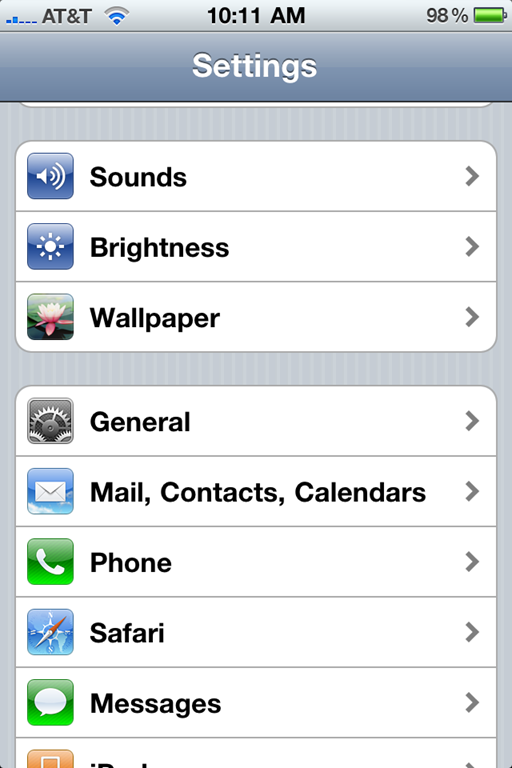
To attempt the fix go into Settings app on your iPhone. Tap General and then go to the very bottom and tap Reset.
004005[5]

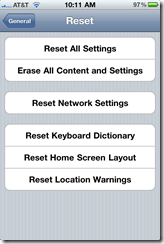
The resulting page will look like the first image below. Tap Reset Network Settings. DO NOT tap any of the others or you will mess things up seriously. The first one resets all your settings to factory default but leaves your apps intact. The second one erases your phone, kind of like doing a factory restore on a PC erasing all your apps and data. Steer clear and hit the third one all by itself in the middle.
006008

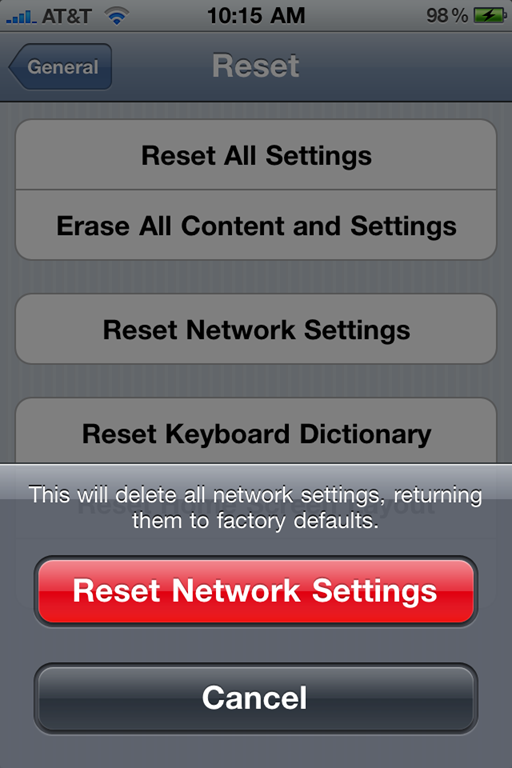
The Reset Network Settings will result in the screen above on the right. Tap the red Reset Network Settings and then let your phone do the magic. It will restart, potentially fixing your reception and your proximity sensor.

Let us know if it works for you in the comments.

Tags: , , , , , ,

Category: How To, News, Tutorials

Comments (87)

Trackback URL | Comments RSS Feed

  1. Kreisman says:

    Tried it, but still have same problem

  2. Robert A Hart says:

    Unbelievable! It worked on mine. I was with you on the 2 finger hold, and doing everything possible to keep from adding a 3rd person to the call, or hanging up/muting, or other! Thanks for the tip – I really had my doubts, but tried a few calls after the reset, and the phone screen stays black, just like my prior iPhone. Thanks for the tip.

  3. Chiadisan says:

    The problem returns after doing this. Trust me. The support forum for this issue is now at 100 pages! I wish the Mac news sites would pick back up on the Proximity sensor issue.
    Apple has GOT to come clean!

    http://discussions.apple.com/message.jspa?messa

  4. Jdsmke says:

    Amazing … it fixed the proximity sensor issue …. now to hope for the reception problem.

  5. JM says:

    Unfortunately this didn't help the cheek dialing issue for me.

  6. Prabs says:

    Looks like it worked for me!

    Not sure though…I can still get it to come on but doesn't seem to be nearly as bad as before.

    Why didn't they just leave this alone? It worked perfectly on Iphone 3G.

  7. Eyz says:

    Why iPhone 4 has so many problems…

  8. Jw says:

    How can turning off the phone fix anything! Reset the settings! No that's funny. When did they get out of setting? On the ship from China? When you put it into your pocketbook? It's a faulty sensor. The distance changes every time if goes off and on! The only way to repair it is to replace it! If it does fix it it is only because the problem is intermittent! I noticed my phone cutting off and on while driving down the road the other evening. $100 says that everybody who reports a fix is having the problems all over again. “well it must be because I turned the phone off last night!
    I know it's sun spots!

    • WM says:

      Jw, I’m not sure if you have noticed, but it is 2010, not 1952. Phones now include a thing called software. It isn’t as cut and dry as you are making it out to be. My proximity sensor did not work once since I got the phone, and immediately after I did this, it worked. Magic or a software glitch, hmmm I wonder which one.

      • JW says:

        Hahahaaha 1952 what a dork and you are trying to say the prox sensor is a program? A couple of lines of code and she’s fixed? Then why is it taking so long? I guess the programers are from the 50′s also. Maybe you could help them with your acumen! This is just a diversion to put you off till your warranty runs out. It’s a tactic management uses all the time. Whats good for business isn’t necessarily good for you. But you ignore it with your rose colored glasses, oops another 50′s pun. Its obvious that you have never run into an attorney or believe all the advertisements! I work for the airlines and I run into people like you every day. But why can’t we fly in ice and through thunderstorms. I grew up with technology I didn’t just waltz into it. What makes you think China doesn’t have a quality control problem? Apple can’t absorb this so they are putting it off. If it were software it would have been fixed! Which it has from the jailbreak croud.

        PS if you have a problem reading this I’ll get my 4 year old to translate it for you!

        Just Fix The D A M N Thing!

        • AK says:

          JW, you’re saying that the software is not the problem, yet you said the “jailbreak crowd” has fixed it. As far as I know, they only mess with software and firmware, not the hardware itself (except for a few extreme cases). So how can the “jailbreak crowd”, masters of software/firmware, have fixed the problem without messing with the software itself??

          You say you “grew up with technology”. It must have been 50′s technology, because you clearly don’t know what you’re talking about.

  9. Telly says:

    Exactly!!!

  10. Orbatron says:

    Did the 'Reset Network Settings' AND the 'Reset All Settings' resets and the problem still persists. What the heck? It worked fine on my 3G. Why did they change the way the phone detects proximity?

  11. Bevan says:

    Did the reset, problem still in full force.
    Last phone call I managed to cheek into both “Speaker” and “Mute” (but not at the same time).

  12. Aei says:

    Didnt work for me.

  13. Madams1954 says:

    Followed the instructions to fix the proximity sensor issue and today got a call. The result was I hung up on the person once. Called back. Hung up a second time but also called another person all with my cheek. Very annoying! I'd have to say that the fix didn't work in my case.

  14. Lenny says:

    didn't do anything.

  15. Shannan914 says:

    This worked for me!!! Tried 5 calls in a row, no cheek issues!!! Thanks alot!

  16. cribasoft says:

    The app Call Guard works as a workaround for this problem…

    itms://itunes.apple.com/us/app/call-guard/id386251981?mt=8

  17. Natalie says:

    I've been having this problem and called Apple support. It has not worked for me. Now I've got to decide if I like the iPhone4 enough to keep it even though it's hard to use as phone…

  18. Pastorlee says:

    I called Apple and was told that there was a software fix coming for it. They wouldn't give a time-table other than soon.

  19. David says:

    The iphone 4 also seems to have problems with the camera. Many users, including myself, found that their new iphone 4 camera will not open at all, while others report yellowed images and problems with the proximity sensor.

  20. MG says:

    Wow… I think it worked!

  21. yapper says:

    Hey, The iPhone 4 proximity works fine after fix! Thanks!!!

  22. Donie Kelly says:

    This doesn’t work. It could actually be worse or the same. Either way it’s a pretty annoying issue. You can deal with the reception issues but this sensor problem is just a PITA. I can safely say 80% of my calls are put on hold.

  23. DonnaH says:

    Unfortunately the fix did NOT work for my i4; I was really hoping it would. I’ll continue looking for a permanent remedy. In the meantime, I recently found a 99 cent app “Call Guard” that locks the screen after making a call and prevents any of the annoying hold, mute, making calls, disconnecting, etc., that plague the proximity sensor bug. Bummer I didn’t return the 4 for a replacement in the beginning.

    • Drew1970 says:

      I hear that! When I first walked out of Best Buy, I thought I was one the the “lucky” ones who actually found the phone in stock. I had no issues (or I thought I had none) for about 4-5 weeks (just in time for the in store return to expire (go figure). Then I updated it and all hell broke loose. It ghost dials, opens apps while I’m talking, mutes people, hangs up on people. This sensory issue is a JOKE. I hear all these great things about the power of the iphone 4 but you could build a time machine but if it doesnt work, its just a giant pile of S@#t! I am so sick of this phone that I am almost tempted to turn on my iphone 3G until they fix all the issues. I never had a problem with that phone and I had the waterproof case also.
      If they don’t fix this soon, then I’m done with AT&T.

  24. Manleyman says:

    I tried everything on the web that I could find to fix this problem. iOS 4.1 didn’t solve it. I did finally figure out what was making my phone act so strange! I had my old case from my 3g iPhone on while I was waiting for the free case in the mail. a 3g silicone case wraps over the “earpiece” of the phone, an iPhone4 case does not. This is the area causing the problems. I simply removed the old case and the phone functioned perfectly! I put the case back on, tried to make a call and it would get confused (on against my face, off when I pulled it away). Take the case off…and it ran perfect! Woohoo! Finally! Strange thing was it only affected the phone portion of the iPhone..it had no effect on the App portion of the phone.

    If you have Proximity Sensor problems and you have a case the wraps over the front edge of your phone…take it off and see if your problems disappear.

    • tajunione says:

      I had exactly the same problem with my iPhone 3GS. It was the case causing the problem. Different case no problem. Now having this problem on my new iPhone 4, as I’m using my old 3GS case – didn’t like the one that was supplied with the iPhone. Will either have to modify the old case (what a mess!) or buy a new case (I think this will be my best option).

  25. Spinn784 says:

    The proximity sensor issue is being caused by certain cases/screen protectors. I had an anti glare protective screen on my iphone 4. It worked perfectly. I put a privacy/anti glare screen on instead and started getting issues. I took the privacy screen off, made a call and had no issue. I then put on an anti glare screen like i originally had on and again, no issue. Therefore, if you are using a thick privacy screen or maybe a weird case that blocks the sensor in a certain way, you are probably having an issue because of it. Hope this helps.

    • vinzSG says:

      ey dude you might be on to something here,i am using a privacy film right now and that is the time all the PS issues came out so frequently,where as on my old mirrored film before didnt get any PS issues,but now i am very interested if this is really the case here,would the privacy film(which obscures the view of the screen in a certain angle,would also reverse the effect in relation to the proximity sensor sensing outside light or somehow confusing it in a way)would really coz this haywire with the PS,can anybody else also confirmed this which are all using privacy film on their screen,that this is the real issue here?

      thaks a lot

      cheers

  26. Who are you says:

    The proximity sensor is above the ear speaker. This means that it is necessary to have that part of the phone close to your head. Some people probably rotate the phone into position in different ways. Try placing the top of the phone, the ear piece, near your head first, and then pull the bottom, the mic part, into position.

    There are probably numerous idiosyncratic differences in how the phone is position which all affect by who and when successful operation is experienced.

    It used to be on the left top corner of the phone and that was probably much more likely to result in correct operation, especially with a 1/2″ range compared to the apparent new 1/4″ range.

    • Guest says:

      I really think this is the issue. I just upgraded to an iPhone 4 from a 3G, had no problem on the 3G with the sensor. On the 4 however, it was a major annoyance until I rotated the phone down a little while talking on it. Seems to have gone away.

  27. Ray says:

    I am on my 4th Iphone 4. Nothing fixes the proximity sensor issue other than don’t hold the phone anywhere near your face. Use the speaker or a headset. It is an ill thought out design. They tried to pack too much stuff into a small platform. My guess is that they integrated the sensor too close to something else that inhibits its sensitivity or they have a totally broken batch of sensors (which i highly doubt). They screwed up the design plain and simple. Too much stuff packed into too small of a platform, antenna issue and all. That i can live with but hanging up on people, dialing digits in their ear, putting them on hold and facetime calling them on each and every call is too much for me. Back to the BlackBerry Torch which I happen to think is a really excellent platform. Finally BlackBerry is starting to get it right. Apple for some reason is heading in the wrong direction at least for the moment.

  28. Lisa says:

    I took my 2 piece case off, as was suggested in a previous comment, and I don’t get this problem anymore.

  29. Star Lyte says:

    The app is called “Call Guard”.

    • Although it’s ridiculous to need an app in order to use my iPhone 4, I am grateful that someone created it… .99 well spent… If only Apple could fix it for real, this device is just a shiny case full of bugs… Very disappointing…

  30. Outpour says:

    ok, tried it, but it’s usually when I hold the phone with my shoulder…did another accidental FaceTime call to my wife…why would I, she’s got a 3G??? yeah, i’m frustrated by this, but I love the camera/HD video (not thrilled by HDR, though), speed of it, and wow, that screen resolution!

  31. Markus says:

    I’m a little shocked but I think it worked. Just tested a few calls and so far so good. No cheek muting or dialing.

  32. Never ever I’m gonna buy any Apple product. It’s enough for me to suffer from macmadness 8 hours a day at work.

    iWhatever is just hype hype hype. Great looking but not meant to be used.

  33. Mike K says:

    Worked for me! Thanks!!

  34. Kristian says:

    It seems to have worked for me! Thanks!

  35. Mary says:

    THANK YOU, THANK YOU, THANK YOU. I now have a Black screen when talking with the phone to my ear.

  36. Kasi says:

    works for me so far!! :D

  37. Jeff P says:

    Worked for me, so far

  38. Eamon says:

    Unbelievable!!! Worked for me after spending an annoying couple of weeks dropping calls…. will respond if it comes back. Thanks!

  39. It worked for me. I’m wondering if this particular problem is caused by upgrading from the first iphone to the iphone4. I know a number of people, including me, who made this upgrade … and with it came the sensor problem solved by this method.

  40. Doug says:

    Wow! I’ve been experiencing the sensor issue for several weeks now and assumed there was something wrong with my iphone. I was one of the lucky ones to get it on the day it became available in stores. I didn’t remember having any problems with the sensor back then and only noticed the problem several weeks ago. I work in the graphics industry and have been decorating my iphones and macs with my own decals for years. After reading this article and all your replies, something occurred to me. Several weeks ago was when I decorated my iphone4 with decals. I put a large one on the backside with a hole for the camera and LED. On the front side, I placed a decal around the screen with holes for the home button, frontside camera and ear speaker. The thought never crossed my mind that the front side decal might be interfering with the proximity sensor. Well, today I removed the decal and guess what??? THE SENSOR WORKED PERFECTLY. NO MORE PROBLEMS. I love my iphone4 and am so glad that there is nothing wrong with it anymore. So if you’re all experiencing the sensor issue, make sure your case, screen protector or decorations aren’t interfering with the sensor. Good luck everyone.

  41. Viz says:

    I found a rather simple solution to this…start your call, switch over to notepad, leave notepad open while you talk. Done.

  42. balding says:

    Just got my phone this, the resetting the network worked like a charm for me.

    Thanks to all invloved

  43. chris says:

    I did a restore through iTunes and it solved my problem.

  44. Yani says:

    It just was the case!!!! Im so happy!!!

  45. Mita says:

    The network reset seems to be working so far. Thanks!

  46. JInxy says:

    This is my first iphone and i just hope i had never bought this. Apple exchanged my phone but the problem persisted. i reset the network but it did not help. This is the worst smart phone i have ever bought. It does everything else well except phone calls. I am quite surprised why people are cribbing here and not return the phones. It quite strange that poor quality is well tolerated by “smart people” or are they??? I think people will buy junk specially if Apple sells it…..

  47. jason Green says:

    The Fix did not work on my Iphone4, but thanks anyways.

  48. aprillee says:

    I have been putting people on hold and hanging up and dialing random people for months. This fixed the issue perfectly! Sweet– thanks!!

  49. sunntonya says:

    got my iphone4 from singapore and have the problem of proximity in the detection of wifi…tried the reset and it did not work…question lingering in my mind is…since i am in the philippines, will the istores here replace my phone or do i have to go back to singapore to have it replaced.

  50. Larry says:

    It is not the telephone, it is the screen protector you are applying to your screen – especially the “black ops”-looking high-privacy screen guard. Take it off, and your handset will work perfectly.

    • Kat says:

      YES! It worked! I have a new iPhone from Verizon and was totally annoyed by the constant cheek dialing… ended up beeping through every conversation. Did the network settings reset and it seems to be fixed. Thank you!

  51. andersgi says:

    It’s not only screen protectors and cases that cause this issue. My iPhone 4 has no front-side protection or case and I’m still experiencing a lot of “cheek dialing”. It also seems to have gotten worse the last few days. I’m currently using iOS 4.1. Will try the fix mentioned here as well as upgrading to 4.2.

  52. Hey for anyone who is reading this i struggled a few days with the proximity sensor issue, but i soon found out that it was my case that i had purchased was covering my sensor. so check your case. So sold this issue i got a drill bit and drilled a larger hole for the sensor ( the case was plastic) now it wasnt the cleanest look but it worked. It suited the needs and the case still does its job. THAT IS HOW I FIXED THE ISSUE

  53. Holly in La says:

    Use a blue tooth or use speaker phone! Clears up that proximity issue! ;-) I’m kidding about this! I know not everyone wants to use speaker phone nor do they want to buy a blue tooth ear piece. However, it DOES work!

  54. Rick says:

    I fixed mine. I fixed mine.

    I have read all day about people with the same problem as me. Ear Dialing. Ear Facetiming. I hit mute, speaker phone and I call people without meaning to.

    I talked to the fellow at the AT&T Store and he was frustrated because Apple ignores the problem. He understood my frustration and tried to give me all the answers that his job called for.

    I finally went to WalMart and bought an Incipio Case for it. It was on sale for $12.99 from $19.99.

    It would have been a bargain at $19.99. The proximity sensor problem is G O N E.

  55. Bob says:

    Stop fighting the issue get call guard. It worked. Problem solved.

  56. Alfred says:

    The “reset network settings” fix seems to work for me. Used to be constantly irritated by the cheek muting of calls and people hanging up on me as a result. Tried the fix more than a month ago, so far seems to have solved my problem, no more cheek muting of calls. But to be on the safe side, I bought Call Guard also; so far have not had to use it.

  57. John says:

    It worked! Sort of. I reset the network settings, and it didn’t fix it. Then I took my Otter case off, and the proximity sensor worked and blacked out the screen. So I got a cue tip and cleaned out the plastic covered holes near the ear piece and cleaned the screen, and now it works! Network settings or dust – not sure, but I’m just happy it works.

  58. susie says:

    So I’ve had a 3G for about a year and a half. For the most part it has been a loving relationship. That is until about a month ago when it started acting wonky–opening apps on its own, calling people on its own. Now the screen won’t recognize my touch at all. I can’t open it. Can’t make calls. Nada. I’ve got a pricey paperweight.

    A bunch of times I’ve tried fixing it any way that I thought might work. I tried resetting it a number of times by holding down power and home button and that didn’t work. I tried taking off case and screen protector. No dice. I tried a full restore (twice) and it didn’t work.

    I just tried this and right now it seems to have helped. If in two weeks my phone is still working as it should, I am going to bake you some bad-ass cookies. Thanks :)

  59. rbc says:

    Didn’t work. Replaced OS and tried this. Think it is on old otter box problem maybe.

  60. silentalex says:

    I did the reset, tried clean restore, even update. Now I’m in ios 4.3.3 and problem still exists!

  61. Joanna says:

    OMG! It was the otter box case. I took it off and the screen went black so I could talk without cheek dialing. I really like the otter box because it has saved me twice!

  62. Jenny says:

    I didn’t try the reset since it apparently doesn’t work with most phones, and I didn’t want to have to type in all my passwords again. but I downloaded the call guard app (there are a few similar ones out there, and this is the highest rated). You have to double click the home button and start it each time you are on a call, so it’s kind of a pain but it completely fixes the problem. It just provides a blank colored screen that blocks the keypad/mute/speaker/etc. Quick and easy fix in the meantime.

  63. Maria says:

    I tried the reset and that didn’t work. Then I took my otterbox case off and it worked then. It’s really annoying that the sensor doesn’t work with the case on. I’m not sure what to do because I just bought the phone and case last week and I don’t want to buy one of the cheaper cases that doesn’t protect it well….anyone know any other fixes?

    • Kizzy says:

      Maria, I peeled off the clear plastic seal on the tiny little hole on the otter box cover to expose the sensor and it worked.

  64. Keith Wofsey says:

    This worked for me.

    Thanks!

  65. Pumpette says:

    Worked! Thanks…

  66. Kizzy says:

    I just got the I-phone 4 and it was working beautifully. Then I suddenly started having problems with the proximity sensor. Just one day of this and it drove me mad to the point that I dreaded the possibility of being stuck with such a beautiful phone with such a SERIOUS problem. I was muting all my calls!! I immediately began searching on line for the cause and found this site. When some of yu mentioned the possibility of it being the phone cover it dawned on me that I had just started using an otter box cover at around the time that the problem started. I took the over off and THE PROBLEM WAS SOLVED!!! The plastic seal on my cover is clear so I don’t think it’s a privacy screen thing. I peeled off the plastic seal from the tiny hole on the otter box cover to expose the sensor and put the cover back on. This worked perfect! I now can use my otter box cover AND the sensor still works!

  67. lcmaly says:

    I have been SO frustrated with cheek dialing and putting people on speakerphone in the middle of calls. I really thought nothing would fix this. BUT THE NETWORK RESET DID! Thank you so much!!!!

  68. t2 says:

    I did this, and it worked. Well, test of one, it worked. I applaud your info, and boo to the naysayers!

  69. Sariah says:

    Tried resetting the network. It didn’t work but removing the plastic film did the trick. Thanks for the tips guys!

  70. website says:

    Wow, wonderful blog structure! How lengthy have you ever been blogging for? you made blogging glance easy. The overall look of your website is fantastic, as smartly as the content!

  71. I take pleasure in, cause I found just what I used to be taking a look for. You have ended my 4 day lengthy hunt! God Bless you man. Have a nice day. Bye

  72. nancy says:

    worked for me, thanks

  73. Lou says:

    I am going to Apple today to exchange this phone for the 4th time. I have done several resets, held it differently, and short of calling the phone fairy, I have tried every thing. This phone has an inherent hardware/software problem that renders the phone useless for making or receiving phone calls. The only way around this is to use a bluetooth headset, which I simply HATE using, very uncomfortable to have that thing in my ear all the time.
    My problem is I am stuck with this sucker until Nov 2012, but given all the issues, I am going to pull the trigger on a different phone. Doing research now on Droid and others.
    I love the functionality of the Iphone, however a phone that you can’t stay on a call, is simply useless. This proximity sensor not only hangs up, but it goes in and out of speaker, puts you on hold, mutes, goes into camera modes, turns apps on while you are talking, iTunes comes on, it’s a freaking mess, I have come close to taking a hammer to the damn thing on several occasions. It is utterly frustrating, and I would NOT recommend this I4 to anyone that needs to have a reliable phone connection. I have ZERO problems with reception, no problems there at all, battery life is awesome, and the apps are to die for, but that is where it ends. Keep in mind that the I4 is a phone, so if it doesn’t function as a phone, you are better off buying an IPad, and getting a reliable phone for phone calls.

Leave a Reply