• Search
  • Home
  • Deals
  • Reviews
  • How To
  • Contact/Tips
  • Create Your Custom Notebook
  • Home
  • Deals
  • Reviews
  • How To
  • Contact/Tips
  • Create Your Custom Notebook
  • site logo

How To Automatically Log Into Windows 7

AndreSeptember 2, 2011
How ToHowTo

If you would like to automatically log into Windows 7, you can have the operating system do so. There is a potential security risk, I strongly would not recommend you do this on a laptop, public or shared computer. If it’s a stationary computer that is in your home office or study, then the risk are much lower. Of course, if someone breaks into your home, its gonna be a piece of cake for that person to break into your computer too.

Anyway, lets take a look at how to setup Windows to log in automatically:

image

Click Start, then type: remove netplwiz into the box.

image

Hit Enter on your keyboard.

image

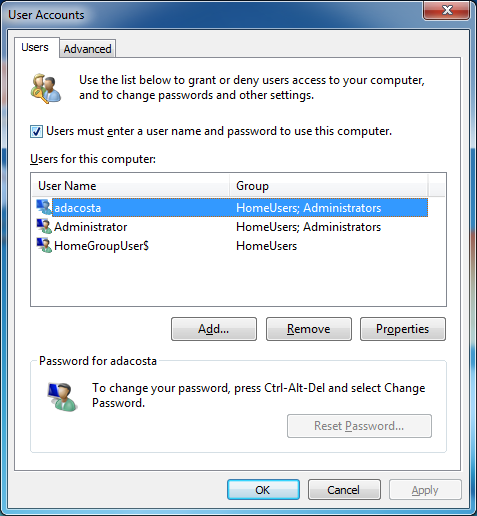
On the User Accounts window, select your account name then uncheck the box Users must enter a user name and password to use this computer. Then click Apply.
image

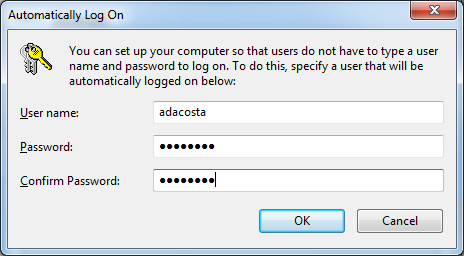
Enter your password and confirm it then click OK.
image

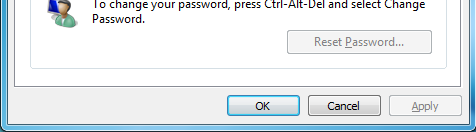
Click OK.

You will now be able to log into your computer automatically.

Share this:

  • Share
  • Email a link to a friend (Opens in new window) Email
  • Share on X (Opens in new window) X
  • Share on Facebook (Opens in new window) Facebook

Related Posts

  • How to Take Screenshots in Windows 7, Windows 10 & More

    Microsoft’s Windows operating systems let users do a lot of things. Every day, machines loaded…

  • How to Find Your Windows Key

    Even though Windows 10 has made upgrading Windows easier than ever, sometimes you still need…

  • What's New in Windows 10 Anniversary Update

    On August 2, 2016 the Windows 10 Anniversary Update came out with some cool new features…

Advertisement

Automatic Log onAutomatically log into your computercontrol userpasswords2netplwizPasswordsSecurityUser AccountWindows 7windows vista

Related Posts

  • HP Mini 311, Mini 110 Coming To Verizon For Under $250

  • 5 Tips for Buying a Windows 7 Netbook

  • How to avoid KeyLoggers to catch your userid and password

  • How To Remove Items From Startup In WIndows 7

  • How to turn on God Mode in Windows 7

  • Buy a Windows 7 Notebook over $699, Get a Free Xbox 360 4G: Back To School Promo

  • article placeholder

    New Apple Ad for Windows 7 (video)

  • Intel Purchases McAfee For Enhanced Security

Leave a Reply Cancel Reply

Your email address will not be published.

Recent Posts

  • Lenovo IdeaPad 530S: Thin & Light Metal Notebook Under $800
  • Lenovo IdeaPad 330S: Power & Portability Under $500
  • $249 Windows 10 Laptop Arrives With Style & Choice
  • Best of CES 2018: The Tech You Need This Year
  • Razer Project Linda Turns Your Phone Into a Badass Laptop

Recent Posts

  • Lenovo IdeaPad 530S: Thin & Light Metal Notebook Under $800
  • Lenovo IdeaPad 330S: Power & Portability Under $500
  • $249 Windows 10 Laptop Arrives With Style & Choice
  • Best of CES 2018: The Tech You Need This Year
  • Razer Project Linda Turns Your Phone Into a Badass Laptop