• Search
  • Home
  • Deals
  • Reviews
  • How To
  • Contact/Tips
  • Create Your Custom Notebook
  • Home
  • Deals
  • Reviews
  • How To
  • Contact/Tips
  • Create Your Custom Notebook
  • site logo

How to Setup Accounts in Windows Live Mail

AndreJuly 13, 2011
How ToHowTo

In this article we show you how to setup an email account in Windows Live Mail 2011 for the first time. We also show how to add an existing email account if you already have Windows Live Mail set up.
image

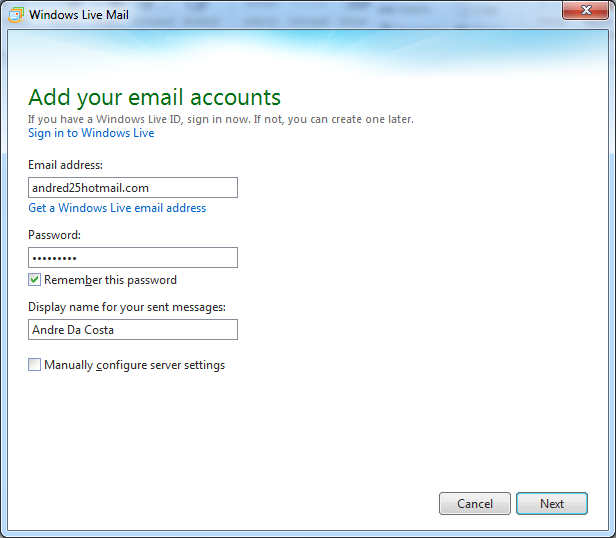
When you launch Windows Live Mail 2011 for the first time you are prompted to add an email account. Fill in all the necessary details, such as your email address, password and display name.

You can check the box to manually configure server settings, but you can leave that option out when setting up a Hotmail or Live account, as Windows Live Mail will automatically recognize those addresses.

Click Next.

image

Click Yes if you are prompted to sign in to your Windows Live services.
image

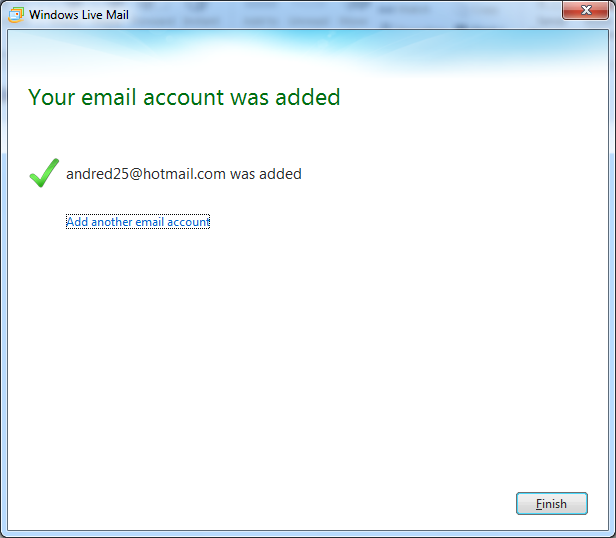
That’s it! Click Finish to confirm changes.
image

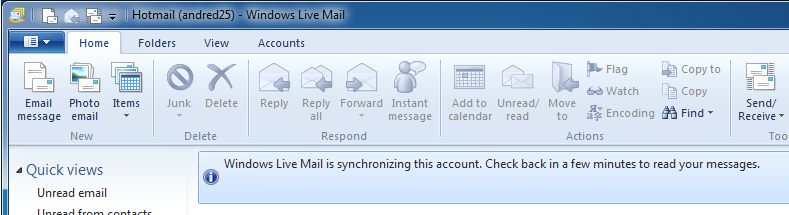
Windows Mail will notify you that it is retrieving your email messages from the server.

Add another email account

You can also add another email account and manage it in Windows Live Mail.
image

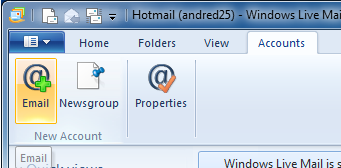
Click on the Accounts tab and click on Email in the New Account group.

image

This will bring up the Add email account wizard again. Fill in all the necessary details. You will notice a new option at the bottom of the window to make this account your default email account or not. After filling out the information, click Next.

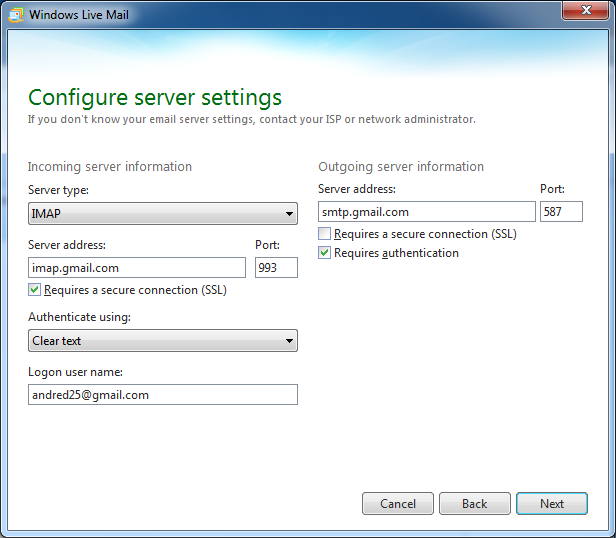
Since we are setting up a Gmail account, we have to manually enter some information for it to work. Let’s take a look at doing that.
image

  • Server Information
  • Account Type: select IMAP from the list box
  • Incoming mail server: imap.gmail.com
  • Outgoing mail server (SMTP: smtp.gmail.com
  • Incoming server must be 993, and must use SSL encryption
  • Outgoing server can use 587, TLS encryption
  • For the Incoming server encryption, select SSL
  • For the Outgoing server (SMTP) encryption, select TLS

After filling out the necessary details, click Next.
image

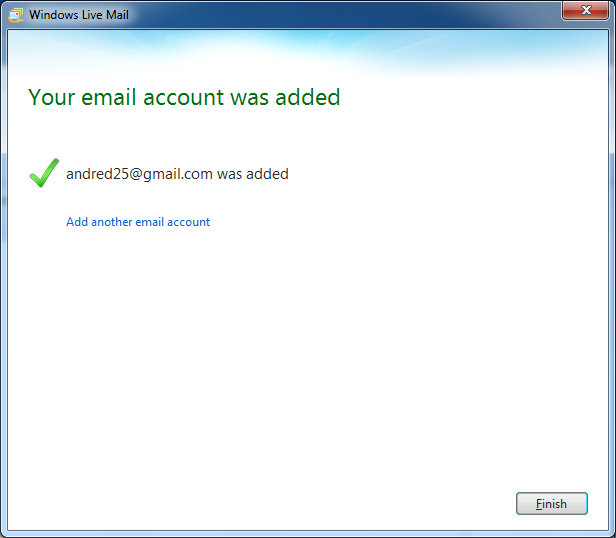
Click Finish confirm the information you entered.
image

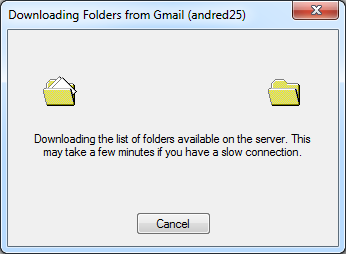
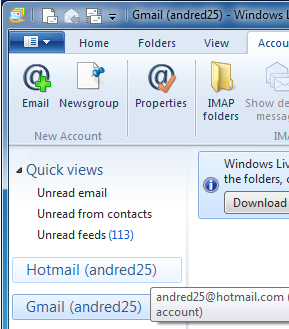
Downloading email folders for Gmail account
image

Windows Live Mail makes it convenient to switch between multiple accounts and check your email.

Share this:

  • Share
  • Email a link to a friend (Opens in new window) Email
  • Share on X (Opens in new window) X
  • Share on Facebook (Opens in new window) Facebook

Related Posts

  • How to Take Screenshots in Windows 7, Windows 10 & More

    Microsoft’s Windows operating systems let users do a lot of things. Every day, machines loaded…

  • How to Find Your Windows Key

    Even though Windows 10 has made upgrading Windows easier than ever, sometimes you still need…

  • How to Email Big Files on Mac with Mail Drop

    Even when you have all the power and versatility of a full Mac at your…

Advertisement

AccountEmail ClientgmailGooglehotmailIMAPSetup Gmail in Live MailSMTPSync MailWeb MailWindows LiveWindows Live Mail 2011

Related Posts

  • Acer Chrome Netbook Details Leaked in Bug Report

  • Google Chrome Notebook Unboxing Video

  • Super Wi-Fi Now Possible Thanks to FCC Ruling

  • Want 1 GB/s internet speed at your Home? Ask Google to Wire Your Town

  • Google Voice for Your PC

  • Disposable Computers: The Google Chrome OS Vision

  • How To Quickly Unsubscribe from Email Newsletters

  • Chrome Malicious Download Protection

    Chrome will Block Malicious Windows Installers – Your Dad’s New Browser

2 Responses

  1. September 30, 2011 Seriously. Incredible. Windows Live Hotmail Reply

    Hi there, I found your site via Google while searching for a related topic, your website came up, it appears great. I have bookmarked it in my google bookmarks.

  2. November 2, 2011 Facebook Account Hacker 2011 Reply

    Hey There. I discovered your weblog using msn. This is a really smartly written article. I will make sure to bookmark it and return to read more of your helpful information. Thank you for the post. I will definitely comeback.

Leave a Reply Cancel Reply

Your email address will not be published.

Recent Posts

  • Lenovo IdeaPad 530S: Thin & Light Metal Notebook Under $800
  • Lenovo IdeaPad 330S: Power & Portability Under $500
  • $249 Windows 10 Laptop Arrives With Style & Choice
  • Best of CES 2018: The Tech You Need This Year
  • Razer Project Linda Turns Your Phone Into a Badass Laptop

Recent Posts

  • Lenovo IdeaPad 530S: Thin & Light Metal Notebook Under $800
  • Lenovo IdeaPad 330S: Power & Portability Under $500
  • $249 Windows 10 Laptop Arrives With Style & Choice
  • Best of CES 2018: The Tech You Need This Year
  • Razer Project Linda Turns Your Phone Into a Badass Laptop