• Search
  • Home
  • Deals
  • Reviews
  • How To
  • Contact/Tips
  • Create Your Custom Notebook
  • Home
  • Deals
  • Reviews
  • How To
  • Contact/Tips
  • Create Your Custom Notebook
  • site logo

Windows 8 Metro Login Screen and Tasbar Caught on Video

Josh SmithApril 18, 2011
News

Windows 8 is picking up speed and now that early builds have leaked to torrent websites, we are starting to see more of the new Windows 8 features like the Metro – Windows Phone 7 inspired – login screen and the ability to set a video as your user login tile.

The new login screen is a break from the traditional Windows login screen, but once you get inside these early builds of Windows 8 there isn’t a huge break from Windows 7. Keep in mind that this early version isn’t necessarily what the final version of Windows 8 will look like when it arrives as a beta (possibly this fall) and arrives as a final shipping version.

Windows 8 login screen

The ability to use a video as your user tile is interesting, but looks more like distracting eye candy than anything else. Still, we wouldn’t be surprised to see a number of users jumping on this ability.
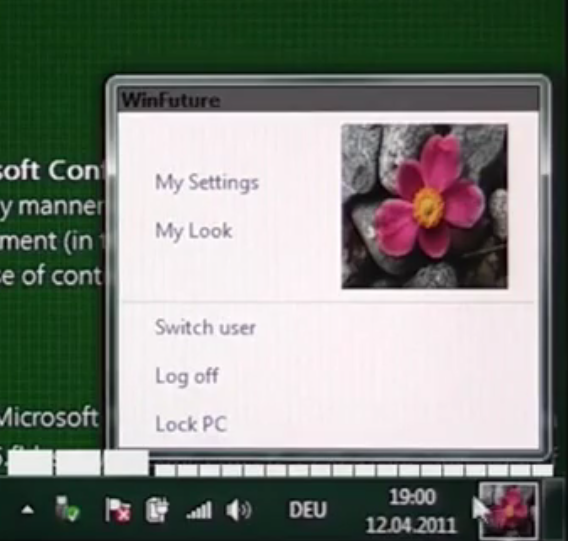
Windows 8 Taskbar

One thing we did notice was the new user area located at the right of the taskbar which allows you to switch between users and access account settings and personalizations. Having a central location for these settings, and making it easy to find, is a nice addition to Windows 8.

Share this:

  • Share
  • Email a link to a friend (Opens in new window) Email
  • Share on X (Opens in new window) X
  • Share on Facebook (Opens in new window) Facebook

Related Posts

  • What's New in Windows 10 Anniversary Update

    On August 2, 2016 the Windows 10 Anniversary Update came out with some cool new features…

  • How to Take Screenshots in Windows 7, Windows 10 & More

    Microsoft’s Windows operating systems let users do a lot of things. Every day, machines loaded…

  • How to Find Your Windows Key

    Even though Windows 10 has made upgrading Windows easier than ever, sometimes you still need…

Advertisement

MetrowindowsWindows 8WIndows 8 loginWindows Phone 7

Related Posts

  • Microsoft Puts Ribbon on Windows Explorer

    Microsoft, Enough With The Ribbon Already

  • HP: webOS to Complement Windows, Not Replace

  • Notebooks.com Week in Review – MacBook Air and the HP Slate – October 22

  • The 22 Best Chrome Extensions

  • gimp windows user interface

    How to Save $1040 with 6 Windows Apps

  • Adobe Flash 10.1 Now Available

  • Dell Inspiron Duo Netbook Tablet Launching in December for $549

  • Dell XPS 15z: Thinnest 15″ PC on the Planet, Takes on MacBook Pro

Leave a Reply Cancel Reply

Your email address will not be published.

Recent Posts

  • Lenovo IdeaPad 530S: Thin & Light Metal Notebook Under $800
  • Lenovo IdeaPad 330S: Power & Portability Under $500
  • $249 Windows 10 Laptop Arrives With Style & Choice
  • Best of CES 2018: The Tech You Need This Year
  • Razer Project Linda Turns Your Phone Into a Badass Laptop

Recent Posts

  • Lenovo IdeaPad 530S: Thin & Light Metal Notebook Under $800
  • Lenovo IdeaPad 330S: Power & Portability Under $500
  • $249 Windows 10 Laptop Arrives With Style & Choice
  • Best of CES 2018: The Tech You Need This Year
  • Razer Project Linda Turns Your Phone Into a Badass Laptop