Tag: Settings

How To Setup 2 Finger Right Click on Windows Notebooks

How To Setup 2 Finger Right Click on Windows Notebooks

| May 17, 2011 | 0 Comments

Mousepads on Windows notebooks are getting better and better these days, and if you happen to have a notebook with a Synaptics clickable mousepad, or ClickPad, you can do more than mutlitouch gestures — you can setup multifinger mouseclicks. The most important of which is a two finger right click. Rather than hunting for a mouse button, [...]

Continue Reading

How to Send From Your Facebook.com Email Address in Gmail

How to Send From Your Facebook.com Email Address in Gmail

| March 18, 2011 | 1 Comment

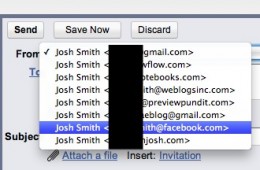
Now that you’ve claimed your Facebook email, we want to show you how to set up Gmail so that you can send from your @Facebook.com email address right within Gmail. Right now you can’t check your Facebook email in Gmail, but if you have Facebook set up to email you when you receive a new message you will get [...]

Continue Reading

How to Reinstall Windows 7 From Scratch: An Effective Method for a Clean Install

How to Reinstall Windows 7 From Scratch: An Effective Method for a Clean Install

| February 15, 2011 | 1 Comment

Yes, I said effectively, there is always a right way to do something and installing Windows 7 is no different. I have discussed many times the virtues of using system imaging in Windows 7, but sometimes you just want to start things from scratch with a clean slate. This can be beneficial by removing any gunk [...]

Continue Reading

How to Set Default Programs and Use Open With and Always Open With Settings

How to Set Default Programs and Use Open With and Always Open With Settings

| February 8, 2011 | 1 Comment

When you install Windows 7 or get a new PC with Windows 7 installed, by default, there are programs setup to do certain things. Whether it’s editing text, viewing images, listening to music or some other common task Windows has a default program to get you going. The programs that come set as the default [...]

Continue Reading

How to Backup to an External Hard Drive

How to Backup to an External Hard Drive

| December 27, 2010 | 9 Comments

In a previous Notebooks.com article we looked at using System Imaging as handy way to backup our entire computer. The benefits being, you are able to keep a safe replica of your system in a working state. System Images though can be quite large, using a lot of hard disk space that might not be [...]

Continue Reading

Using Windows Easy Transfer in Windows 7

Using Windows Easy Transfer in Windows 7

| October 7, 2009 | 9 Comments

So far we have looked at two ways of installing Windows 7 on your PC – Clean/Custom Install or In-Place Upgrading. Many persons will be buying Windows 7 on a new PC when its released and would like to get their personal data from an old PC to the new PC running Windows 7. Windows 7 offers an easy, convenient way to make the move with the built in Windows Easy Transfer utility. As you can see in the screenshot below, I have a lot of files on my old PC running Windows 7, and I would like to get those files over safely over to my new computer also running Windows 7.
Continue Reading