How To Update Your iPhone or iPod Touch to iOS 4

| June 21, 2010 | 36 Comments

The release date of iOS 4 for iPhone and iPod Touch is June 21st. In order to take advantage of all of the new features that iOS 4 has to offer, just follow this informational guide on how to upgrade to the newest iPhone operating system.

Why you want iOS 4 on your iPhone/iPod Touch

Being a free upgrade for all iPhone 4, 3GS, 3G and iPod Touch (Current Generation) models, this new operating system contains many improvements. The following are some of the new features in iOS 4. Note that not all iOS4 features are available on the iPhone 3G or iPod Touch.

  • Multitasking – allows apps to run in the background

  • Bluetooth Keyboard Support
  • iAd network – allows developers to place ads in apps
  • iBooks app to read eBooks
  • Unified inbox – multiple email accounts in a single folder
  • Support for multiple Exchange accounts
  • Portrait orientation lock
  • 5X digital zoom and tap to focus video
  • Folder organization of apps – i.e. Games folder contains all of your game apps
  • Customizable background wallpaper
  • No more Rating of apps prompt upon deletion
  • Improved camera and video editing
  • Enterprise improvements for businesses
  • Ability to send someone an app as a gift
  • Spell checking built-in to Mail, Notes, and other apps
  • Faces and Places integration with photos
  • Ability to create custom playlists directly on your device
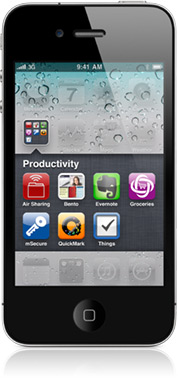
For more information on the new features, visit our iOS 4 Overview page or Apple’s Software Update page.

For iPod Touch users who did not purchase the 3.0 software update for $10, it remains to be seen as to whether or not you can still upgrade to iOS 4 for free.

How to Update your iPhone or iPod Touch

I find that the simplest and quickest way to update my iPod Touch is directly in iTunes. Using three easy steps, this guide will show you how to update your device using iTunes. I am using a Mac, but the same thing can be done using Windows.

Step 1. Ensure you are running the latest version of iTunes.

  1. Open iTunes.
  2. Click on iTunes>Check for Updates… in the menu bar.

  3. If an update is available, a pop-up will appear. Click Download iTunes.
  4. This will open Software Update. I would recommend that you download all the available software updates, but you may also deselect everything but iTunes. Once you click Install, the update will perform automatically.
  5. If you have not already, quit out of iTunes.
  6. Once the new version of iTunes has downloaded, Agree to the License Agreement that pops up. Note that sometimes, your computer may need to be restarted in order for the new version to launch. If prompted, restart your computer.
  7. iTunes should automatically launch, running the newest version.

Step 2: Connect your iPhone or iPod Touch to your computer.

  1. If it is not open already, open iTunes
  2. Connect your iPhone or iPod Touch to the computer via the USB port and the cable that came with your device.
  3. Your device’s name should appear in the side bar of iTunes.
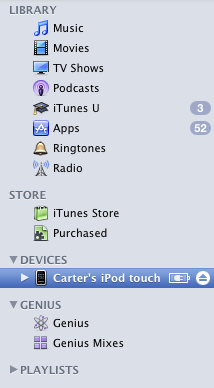
  4. By default, your device is set up to automatically sync with iTunes. This may take a while, as the device needs to be backed-up in addition to syncing.

Step 3: Update your iPhone or iPod Touch’s software (iOS 4 available June 21)

  1. Click your device’s name in the sidebar to bring up this screen.
  2. Under the Summary Tab, click the “Check for Update” button under Version
  3. If an update is available, click Update.
  4. This download may take a while. Make sure not to disconnect your device or quit out of iTunes. Various prompts may appear once the software is downloaded. Click Accept or Continue for all prompts. Included in this will be the License Agreement, in which you must click Accept.
  5. If the update is successful, under Version, it should say “Your iPod (iPhone) is up to date. iTunes will automatically check for an update again on (insert date).”

There you go. You have successfully updated your device to iOS 4. Enjoy!

Tags: , , , , , , ,

Category: News

Comments (36)

Trackback URL | Comments RSS Feed

Sites That Link to this Post

  1. How Long Does it Take to Upgrade to iOS4 | Notebooks.com | June 21, 2010
  2. Apple iOS 4.1 Now Available | Notebooks.com | September 8, 2010
  1. nick says:

    it is June 21 and when i press check for update it still says “This version of ipod software (3.1.3) is the current version. Also my itunes is up to date

  2. Lyanez says:

    They still haven't released it, last year it was released around afternoon time.

  3. Kate says:

    Thanks for your help!

  4. nick says:

    thanks

  5. blcnyc24 says:

    i'm running itunes 9.1.1 but when i select my iphone and click update (my button isn't called 'check for update') on the summary tab i just get a pop-up that my version of itunes is the latest version – nothing about the iphone software at all

    any suggestions? thanks in advance

  6. blcnyc24 says:

    never mind i figured it out. even though the version check in itunes said 9.1.1 was current, the software update suggested 9.2 – after that 4.0 downloaded

    thanks anyway

  7. Jt says:

    Does anyone know of a way to force this install on a first gen iPod touch? Even if it doesn't have the horsepower to multitask, I would like some of the other features.

  8. Snouty says:

    Oh my, everything went well until it rebooted the 2nd time then itunes said “Cannot restore your ipod because the password was incorrect” Now I have a dead ipod touch :(
    Oh I never set a password so I don't know what it could be :(

  9. Joe says:

    try '0000', since that tends to be the default lock on mobile devices

  10. Karlaabomb says:

    I need help with my iPod touch !
    I tried updating it & everything was fine until a window popped up saying
    “Windows needs to install driver software for your Apple Mobile Device (Recovery Mode)”
    then it gives me 3 options:

    1) Locate and install driver software (recommended)
    -windows will guide you through the process of installing driver software for your device.
    2) Ask me again later
    -windows will ask again the next time you plug in your device or log in
    3) Don't show this message again for this device
    -Your device will not function until you install driver software.

    What Do I Do !?
    I NEED SERIOUS HELP
    My iPod won't go back to its normal mode,
    on my iPod's screen all I can see is the USB cable pointing up at the iTunes logo.
    I can't get out or nothing.
    ;(

  11. Nick Herston says:

    I installed iOS4 last night, and today I downloaded a full album from itunes over the 3G network, and it showed all the songs going through the download process. When it was done, I was expecting to see the songs on my ipod on my iphone, but I did not see them, and they were not in my purchased folder in itunes. I tried to buy it again to see if there was an issue with the first download, but it said that I had already purchased this album, but would I like to buy it again. Really???? I cant even see the one I purchased the first time around. iOS4 glitch?

  12. lfcanishlfc says:

    pls pls pls reply ASAP
    i checked for update on my ipod touch 2g and it found it, so i downloaded and it successfully downloaded.
    however it did not install because as it was backing up it said 'not enough memory on hard drive'. i.e. it was interrupted.
    the next day i replugged my ipod and it said install, so i clicked it but it is taking so long, ive been trying days but the same thing happens. is this because the original 'download and install' was interrupted?

  13. Kkeckler says:

    How long should it take to backup/sync your iphone??? Mine has taken forever. I don't know if it is the update taking forever or the sync but it is getting annoying and I don't know how patient to be!!!

  14. Kbworkit says:

    also try 12345

  15. Jewar3086 says:

    How long does it tak to download and everything cause my itunes is saying 6 hrs i dont have 6 hrs to waste.Trying to download the 4.0

  16. Jhovs says:

    How can i save my voice memo's in my PC

  17. Mazzamrulz says:

    I NEED HELP PLEASE. I go to download (I have updated iTunes to 9.2, and I have the Update option) and it starts downloading. A few minutes later, I get a pop-up saying “There was a problem downloading the software for the iPod 'Nicole's iTouch'. The network connection timed out. Make sure your network settings are correct and your network connection is active, or try again later.” Error 3259. My network is fine…

  18. Sebnem says:

    I have the same problem, could you please let me know if you've sorted out the problem or not? If yes how?

    Thanks,

    Sebnem

  19. Sebnem says:

    Oh well, I found the reason why I couldn't update it: It was because of my Kaspersky virus programme blocking the update. So when I shut it down, the update process started and it is now sorted. How simple the solution is. Can't believe I couldn't think about it 15 min ago.

    Anyway thanks again…

  20. Leem6179 says:

    Excellent information. Thanks!!

  21. Anonymous says:

    This information was REALLY helpful, thanks ALOT!!!! :)

  22. Sandyc3838 says:

    HELP. I just hooked up my IPod Touch to put new music on it from my computer and it told me that a new update was available. Not I cannot use my IPod at all. All it tells me is to hook it to my computer but my computer is not even recognizing it as being plugged in. What is going on. It’s like everything is gone!!!! HELP

  23. moumita says:

    I’m getting the msg ‘connection to the server has been reset’ followed by error 9006. Pliz help. I hve downled the iOS4 version but its tking soo long to update to 4.2 version

  24. John says:

    I have a second gen. iPod and want to install os4 , went I open I tunes it says there’s a newer version to download, click update iPod and it doesn’t do anything, does anyone know what going on?

  25. lukeM says:

    ^^ john i seem to be having the same problem, perhaps you have found out what to do? as i type i am currently syncing every single possible app on my iPod onto my iTunes library, if this proves successful, i shall re-comment.

  26. Shawn says:

    I have a IPOD Touch 16G Polaris. It Has the 2.2 OS. Why can’t I update it to a more recent version?

  27. DEN says:

    @SHAWN—

    Same here. Mine is firmware 2.2. I want to update but i can’t.

    guys, pls help us. tnx

  28. jc says:

    if i update my new ipod touch will i lose everything on it? the ipod is not sync with the computer.

  29. Perry Clark says:

    Good post, nice blog, if ya get chance have a look at mine and let me know what ya thing, feedback welcome http://www.pablosworld.co.uk thanks :)

  30. hi!,I really like your writing so a lot! share we communicate extra approximately your post on AOL? I need a specialist on this space to solve my problem. May be that’s you! Looking ahead to look you.

  31. Navigacija says:

    Definitely imagine that that you said. Your favorite reason appeared to be at the internet the easiest factor to consider of. I say to you, I definitely get annoyed while other folks consider issues that they just do not understand about. You managed to hit the nail upon the top and outlined out the whole thing with no need side-effects , people could take a signal. Will likely be again to get more. Thank you

  32. Pretty nice post. I simply stumbled upon your weblog and wished to mention that I have really loved surfing around your blog posts. In any case I’ll be subscribing on your feed and I hope you write once more soon!

  33. Hi there very nice web site!! Man .. Excellent .. Superb .. I’ll bookmark your web site and take the feeds also?I am satisfied to find so many helpful info here within the submit, we need develop more strategies on this regard, thank you for sharing. . . . . .

  34. error 3259 says:

    SOmetimes i face error 3259 but following above guidelines i fixed this error. This article was very helpful for me. Thanks for sharing this information.

Leave a Reply