How to Charge a Mifi Cellular Wi-Fi Router On the Road
I love my Verizon Wireless MiFi 2200 card. It is a small 3G cellular modem that also works as a Wi-Fi hotspot for up to five devices. It is great for people who are mobile and have more than just one or two Wi-Fi enabled devices that they want to use on the Internet. But it has one enormous and glaring weakness. Battery life is abysmal. (Full MiFi Review)
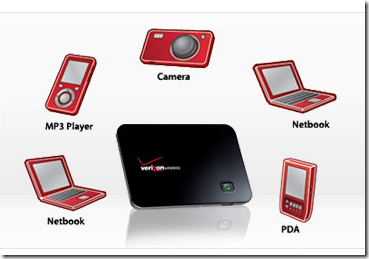
Today I was on the road for almost seven hours going to visit a man in my church who is critically ill in a hospital that is about a three and a half hours away. AT&T 3G covers only about half of the area between my house and Durham, NC where the hospital is and I have an iPhone. So I brought the MiFi card because almost the entire drive has Verizon broadband coverage. With it I could get online with my iPhone, my iPad and my notebook computer, or so I thought.
The second glaring weakness of the MiFi card is that it easily gets turned on. That in combination with the poor battery life resulted in a dead battery about halfway home tonight. You would think that I could simply plug the USB cable that I use to connect it to my notebook computer into a USB car charger. Unfortunately, for some reason, it won’t charge the card. I have tried a few different ones. None worked. Under heavy use the battery actually drains a little bit while plugged in. Then, if I get out for a bite to eat on the way and forget to turn it off, it stays on and drains the battery even more.
I’ve been looking for a solution. I had an AC/DC adapter and plugged in the AC wall charger that came with the MiFi. But today I didn’t have it because, since getting my iPad, I’m draining the battery every day. So I plug it in overnight at the same time I charge my iPad. ![]()
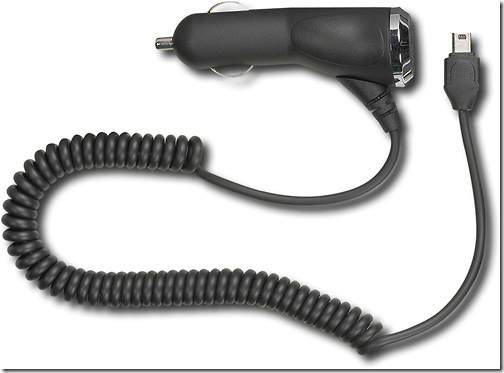
After about 5 hours on the road, and an hour with the MiFi card accidentally left on, it was dead. To make matters worse, the USB cable could not charge the thing; and I wanted to get online for something important while I was in one of those areas without AT&T 3G or even halfway decent Edge coverage.
The good news was there was a Best Buy at the next exit. I stopped and asked at the cell phone section if they had anything that would charge MiFi in my car. Fortunately for me, the guy had a MiFi card too. He walked right up to the Rocketfish Mobile Vehicle Charger which sells for just $21.99. It is has a micro USB connector and plugs into the cigarette lighter. Bingo! I was set.
It worked great and I was able to charge up my MiFi card enough to get a signal. I know some of you are saying, “Kevin, we knew this a long time ago.” But I guess I was too busy to even ask!
I finally made it home and took my family out to get some Chinese food. The card charged enough in the hour I had it plugged in to get Wi-Fi signal for my iPhone, my son’s iPod Touch and my iPad as we sat in the restaurant after finishing eating. I know. We should put away the gadgets when we eat. Most of the time we do.
Category: Accessory Reviews, News
Comments (11)
Trackback URL | Comments RSS Feed
Sites That Link to this Post
- How to Charge a Mifi Cellular Wi-Fi Router On the Road | Notebook Video Review's | May 22, 2010
- Summer Travel Tech: Accessories | Notebooks.com | July 18, 2010
- solBat II Solar Powered USB Charger and Battery Backup Review « Tech Remix | April 25, 2011
- solBat II Solar Powered USB Charger and Battery Backup Review | Blackcyber | April 25, 2011


Hi,Here in my post : http://www.netbook3g.com/test/novatel-wireless-…, some links that can be useful for your MiFi :http://www.dealextreme.com/details.dx/sku.26313http://www.dealextreme.com/details.dx/sku.36150http://www.store.motorola.com/mot/en/US/adirect/motorola?cmd=catProductDetail&productID=98782H-AD&showAddButton=true&prevSortCriteria=sortByScore&descSearch=p790&DispStyle=B2CStyleCategory&catKey=-1&dispColNum=1&dispColNum=1&searchSubmit.x=0&MessageType=catDisplayStyle&MessageType=catDisplayStyle&numberSelected=0&OP=newSearch&FormName=query&FormName=query&filterModuleName=Narrow+By&filterModuleName=Narrow+By&sortAscending=true&showAll2ndLink=false&searchMaxCost=null&searchSubmit.y=0&showImage=false&currPageNum=0&filterDispName=-1&domProductQueryName=p790&refinementOption=true&refinementOption=true&myFilterType=1&myFilterType=1&motoListType=catalog&motoListType=catalog&refineTerm=false&sortCriteria=sortByScoreJeff
Xavier covered the “no charge when connected via usb” issue a while back and came up with a hardware solution. Since then a firmware update has been provided which also resolves the issue.
How do you get the firmware update? I just purchased one of these and it will not work when connected to my laptop.
Yes, I believe you're referring to my post on GBM. The iGo adapter would probably work in this case, but it's not ideal for use in a car unless you've got an iGo adapter kit to go with it. The USB/micro USB iGo adapter cord is really short.
It is another solution if you'd like to try it out though. http://www.gottabemobile.com/2009/10/22/tip-for…
I’ve had this MiFi plugged into a wall outlet since 4PM and it’s now 4AM and it still goes from green to solid yellow when I try to hook it up to my laptop or Ipad. I’m very disappointed and it means a long round trip back into town. The rep was able to use the unit out of the box with his Ipad to reset my password. Now I’m sorry I didn’t just go to Best Buy and have the techs there actually set every thing up for me. I have called Verizon but never got a return call.
I have been exploring for a little bit for any high-quality articles or blog posts on this sort of area . Exploring in Yahoo I finally stumbled upon this site. Reading this information So i?m glad to exhibit that I’ve an incredibly excellent uncanny feeling I discovered exactly what I needed. I so much without a doubt will make certain to do not disregard this site and give it a look regularly.
I do trust all of the ideas you have offered for your post. They’re really convincing and can definitely work. Still, the posts are very short for novices. May you please prolong them a little from subsequent time? Thanks for the post.