Many people use more than just one computer throughout the day. Perhaps you have a home desktop computer, a laptop, and even a work computer. Chances are, you use each of these computers to access the web. What can be frustrating is attempting to keep your bookmarks in order. On just one machine alone this can be daunting, but to have them organized across all machines is even tougher. Luckily there are some great free options out there for effortlessly keeping your bookmarks synced for whatever browser you are using, and we’ve compiled a list of three, just for you.
Google Chrome Integrated Syncing
 If you are using Google Chrome, you don’t even need to install any addition software. Google Chrome has bookmark syncing baked directly into the browser. Enabling it is as simple as plugging in your Google account information.
At the top right of the browser, click on the wrench button, then find Synchronize my bookmarks…â€
 A new box will pop up which will ask for your Google account login info.
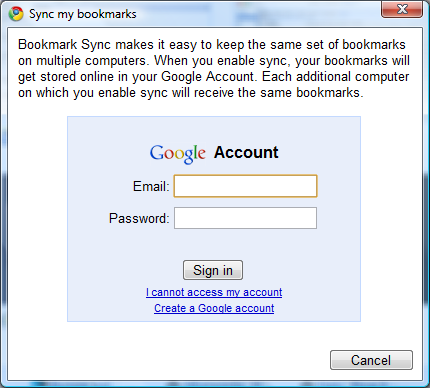 After entering your Google credentials, bookmark syncing will be handled automatically from this point on. Simply go to any other computer that you’d like to keep bookmarks in sync with, and follow the same steps with the same Google account. Bookmarks should be merged, so if you have different bookmarks on multiple computers, everything will mesh together, then you can use the Bookmark manager to organize (ctrl+shift+b in Chrome). Be sure to double check that bookmarks are merging and not being replaced, just in case you have important bookmarks on one of your computers. Carefully read the prompts as you set up the syncing.
Google stores your synced bookmarks on Google Docs, which means if you are ever on another computer that you aren’t syncing with (perhaps a public computer) you can always go to docs.google.com to get access to your bookmarks from any web connect computer (just remember to log out of your Google account when you are done!)
Mozilla Firefox Weave
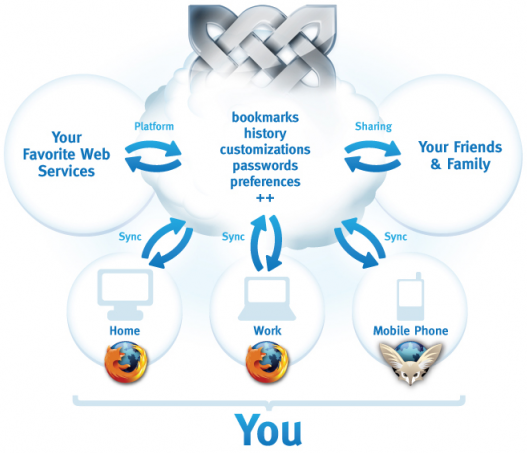
 Weave is an official project from Mozilla which is designed to keep your Firefox sessions in perfect sync. Weave does a little bit more than just syncing bookmarks. Have a look at this diagram which is featured on the Weave website.
 Weave is a Firefox add-on which can be easily installed by visiting the Weave website and clicking Get it now!†You’ll need to be running the latest version of the Firefox browser (to check, go to the Help†menu at the top of the browser, and find Check for updatesâ€). Once the add-on is installed, you need to set up a Weave account:
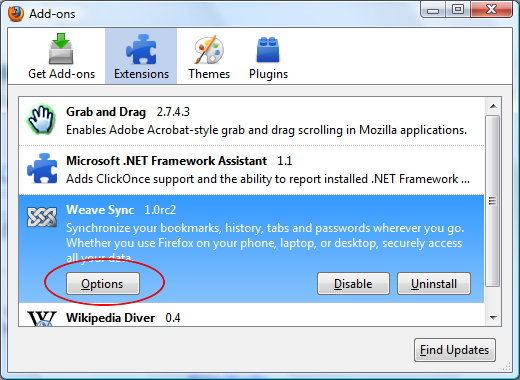 Start by opening the add-ons manager and clicking on Options†on the Weave Sync add-on.
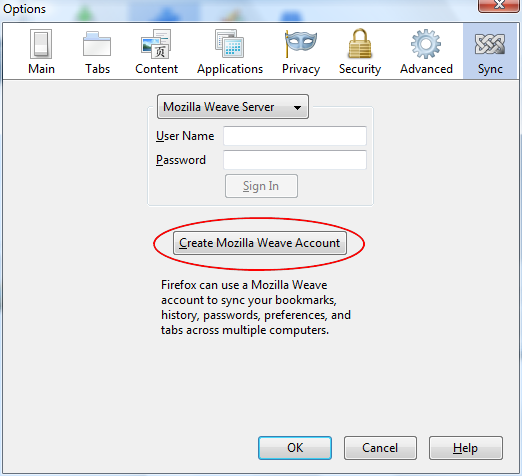 Click the button to create a Mozilla Weave account.
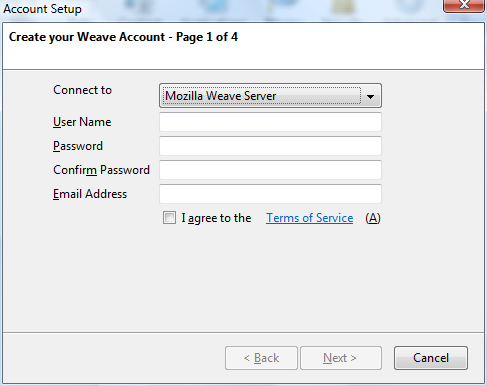 Fill in the required information and hit next. After this window, you’ll have a few more fields to fill out until everything it set up.
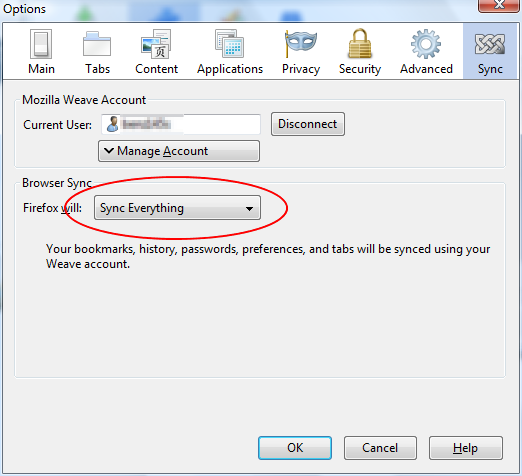 Once the account is set up, use the dropdown box to decide what Weave will do for you. You can choose between syncing everything, or choose Use my custom settings†to decide exactly what gets synced. Once this is done, install the add-on in the same way on other computers that you’d like to sync with and use the account that you just created to fill out the User Name and Password fields in the first step.
Xmarks Multi-browser bookmark syncing
 If you use Firefox or Google Chrome exclusively across all of your computers, the two above options will probably work well for you. However, there are a myriad of reasons that someone might use more than one browser across multiple computers, or even on the same computer. If you find yourself in this group, Xmarks is the solution for you. Xmarks (formerly Foxmarks) started as a very good Firefox-only bookmark syncing add-on. It has since then evolved to support the four major browsers, most recently Chrome. Follow the links below to get the Xmarks add-on for your favorite browsers and start syncing bookmarks:
Again, you’ll need to install Xmarks on each computer and for each browser that you’d like to sync with. You’ll create an Xmarks account to keep everything in order, and if you find yourself on a computer which doesn’t have Xmarks installed, you can visit my.xmarks.com to access your bookmarks.
Related Posts
-
When it comes to setting up your Mac these days, there are only two browsers…
-
Did you know that Chrome has its own task manager, entirely separate from the one…