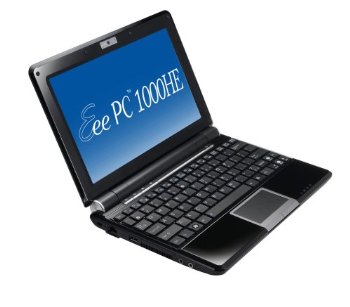
Review: Asus Eee PC 1000HE Netbook
I’ve previously called the Asus 1000HE netbook one of the best values in the netbook market in terms of bang per buck but I had to try it out myself to see if it actually lives up to my expectations. I’ve now had the opportunity to live with the Asus 1000HE for about a month and I’ve performed a good deal of testing on it to see how it performs in common tasks that one would expect a netbook to perform.
For a typical street price of $375 to $399, the Asus 1000HE netbook simply can’t be beat in terms of value. It is one of the best netbooks on the market at any price. The netbook is a bit bulky compared to other 8.9″ netbooks with 3-cell batteries but you don’t need to carry your charger with you and the bigger size screen and track pad is a welcome change in netbook design. You can’t put it in a large coat pocket like the Sony Vaio P but the Vaio costs $900+ and has horrible battery life and a tiny display.
If you’re looking for a reasonably priced 10″ netbook with a great looking non-glare display and all-day battery life, the 1000HE is for you.
The Intel Atom N280 CPU
The Asus 1000HE is one of the first netbooks on the market that use the slightly faster N280 1.66 GHz Atom processor with a faster Front Side Bus (FSB) whereas most netbooks use the N270 1.6 GHz Atom. The 1000HE uses two additional unofficial clock speeds of 1.25 GHz in low voltage mode and an overclocked setting of 1.75 GHz. It’s actually quite common for netbook makers to offer a “turbo” mode for their products and MSI even pushes some of their N270 netbooks to 1.9 GHz and some users even push their Atom processors to 2 GHz. At the stock speed of 1.66 GHz, the Intel Atom N280 has a super low Thermal Design Power (TDP) of 2 watts compared to the 2.5 watt TDP of the N270 processor.
The Intel Atom’s closest competitor is the Via Nano 1.3 GHz processor which has a TDP of 8 watts. The Nano 1.3 doesn’t perform as well as the Atom 1.6 or 1.66 processor. There have been many mainstream websites that have deceptively compared the Via Nano 1.8 GHz 25 watt TDP desktop processor to an Atom 1.6 and incorrectly declared the Nano the superior netbook product. But when we compare actual netbook parts and usable clock frequencies, it becomes apparent why netbook manufacturers have overwhelmingly selected the Atom. The Atom as a netbook processor simply has better performance and battery life than any other netbook processor.
The Intel 945GSE GMA950 graphics chipset
One of the disappointments in the Asus 1000HE is the continued use of the Intel 945GSE GMA950 graphics chipset when the newer Intel GN40 chipset is available.
Unfortunately, we’re going to have to get use to GMA950 because even the next generation of Atom processors will have the 945GSE processor embedded on to the processor package itself as a separate die. But some good can come out of this as software makers are being forced to optimize their software again which results in better performance for everyone whether they use a netbook or high-end desktop computer. However, I see the Asus 1000HE as more of a premium netbook and I wouldn’t mind paying an extra $20 to $30 for a GN40 chipset which decodes 720P or 1080P high definition video.
Asus is coming out with the 1004DN netbook with a GN40 graphics chipset with a smaller 1.8″ hard drive and battery to make room for the optical drive but I’d rather have the bigger/faster 2.5″ hard drive and bigger battery. Optical drives are obsolete as far as I’m concerned and you can always hook up a USB optical drive and rip the movies you want on to the hard drive or just put a bunch of movies on a cheap SDHC flash card.
Glare free vivid contrast display
The first thing I noticed about the 1000HE was the gorgeous 10″ 1024 by 600 display. The display is probably one of the best netbook displays I’ve ever seen and it’s one of the few on the market that doesn’t use a glossy coating. That means you get to look at the actual content on the screen and not the bright reflection of the lights or windows. This particular matte finish display was surprisingly vivid in contrast and it has one of the deepest blacks I’ve ever seen which makes all the brighter colors pop out.
The 1000HE LED backlighting is also super bright.
Tip 1: There are third party tools like eectl can boost the LED brightness high enough to make the display very readable in broad daylight. You wouldn’t want to use that tool indoor because it makes the screen too bright and it drains the battery much faster. Eeectl can also control the fan speed, CPU clock speed and voltage settings though you should be very careful with the tool because you can lock up your system requiring a hard reboot and possibly even damage it.
Unfortunately, most netbooks (and laptops) on the market have unfortunately switched to glossy displays because it’s one of those cheap aesthetic effects that consumers seem to be swayed by. It’s refreshing to see Asus bucking the stupid glossy LCD trend. The only bad thing to say about the display is that it doesn’t have a resolution of 1280 by 800 which is typically only available on 12.1″ LCDs and rarely smaller screens. I could see a lot of demand for a higher priced premium netbook with higher display resolution and GN40 graphics chipset.
Video playback performance
As far as video playback and CPU performance is concerned, the Asus 1000HE is essentially not much different than any other 945 plus Atom N270 1.6 GHz netbook on the market. The N280 1.66 GHz processor makes it slightly faster than the N270 as expected because of additional 3.75% clock speed increase.
I’ve managed to get good 720P video playback performance even in 1.25 GHz power save mode if the application is optimized. Adobe Flash and Apple QuickTime are some of the least optimized video playback software on the market and they fail badly at 720P playback. Windows Media Player, VLC, and Media Player Classic using the K-Lite Mega Codec pack works well with 720P playback. Luckily, I’ve found a great way to convert Apple QuickTime MOV files to AVI files which allow for very smooth playback using VLC using FFmpeg and I’ll follow up with a tutorial on that.
For browser embedded video content, Windows Media Player works the best though it only works on the Windows platform. For cross platform compatibility, Silverlight stutters slightly with 1280×720 (720P) content but runs 854×480 (480P wide screen) smoothly and barely runs 1024×576 (576P widescreen) content in 1.75 GHz turbo mode. Adobe Flash has no chance with 720P and barely handles 480P widescreen content on Hulu.com. You can compare all three embedded players here. The popularity of netbooks will hopefully get Microsoft and Adobe to optimize their video playback though Microsoft clearly has a substantial head start.
The chassis and overall design
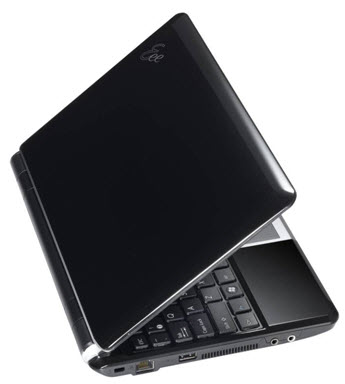
The Asus 1000HE chassis has a glossy finish which looks great until you actually touch the darn thing. Once you touch it, it looks like you’ve been
slobbering all over it because the material is a huge finger print and oil magnet. The 1000HE also has two USB ports on the right hand side which is
really useful for hooking up an external USB-powered optical drive. You need two USB ports to provide enough electrical power to drive an optical drive
and the last thing you want to have to do is use a USB extension cable to reach the other side of the netbook.
Tip 2: There’s a single access panel to gain access to the 2.5″ hard drive and memory slot. If you want to boost the performance of the Asus 1000HE netbook, just put in one of the fastest and lowest power 2.5″ 320 GB hard drives on the market for around $75. I took my Vista storage score from 5.3 to 5.9, doubled my capacity, improve battery life, and boosted transfer times by 50% with this relatively inexpensive investment and it’s the best improvement you can make on any laptop or netbook on the market. For another $20, you can replace the SODIMM and double the RAM which is also very beneficial especially if you’re going to upgrade to Windows 7. 1 GB will worked fine when I tested Windows 7 beta but more RAM always results in better performance. Storage and memory performance is as important as CPU and graphics and often overlooked.
The LCD lid unfortunately doesn’t quite open up 180 degrees or more which is annoying to me since I like to prop my fully opened Lenovo ThinkPad X200 on my thighs on an airplane and read it like a book. The display becomes twice as large because it’s half the distance to my eyes and I can comfortably view two pages side by side. I can still do this to a certain extent with the Asus 1000HE but it’s not comfortable because the display isn’t quite facing me.
Overall, the Asus 1000HE is a slightly larger and heavier netbook because it uses a 10″ display and a huge capacity 6-cell battery but it’s a good trade off
because the product is much more usable.
Bluetooth and 802.11n wireless
The wireless capabilities of the Asus 1000HE are impressive. It comes with both 802.11 b/g/n and Bluetooth out of the box when many laptops charge an extra $50 for these two features. Having 802.11n means you get to transfer files more quickly though you’ll probably want to opt for a wired interface or just using the SDHC slot to transfer larger files. Bluetooth is an absolute necessity for a wireless mouse and cell phone tethering for wireless Internet
access.
The keyboard
The Asus 1000HE keyboard uses a Chiclet design which is common on Apple Macbooks. Overall, I found touch typing on the 1000HE reliable and fast so long as I didn’t accidently palm the track pad (which is why I usually prefer track points). There were some minor keyboard flex issues in the upper left hand corner of the keyboard with the F1, F2, F3, ~, 1, 2, and 3 keys but I don’t use those keys that often and it’s more of a minor annoyance than a problem. This annoyance might be attributed to the fact that this is a pre-production unit. I noticed there were even a few screws missing inside that were supposed to hold the hard drive in place, so I expect the production units to be better.
Best netbook track pad on the market
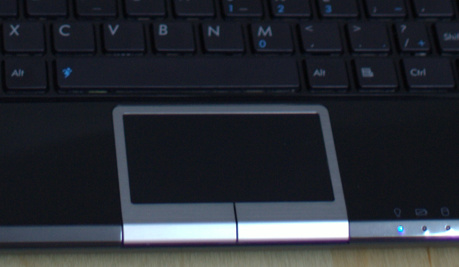
Although I personally prefer a track point over a track pad, the Asus 1000HE probably has one of the best netbook track pads on the market.
It’s big enough and the buttons are correctly placed so you can operate it like a normal track pad on a full size laptop. Most netbooks track pads are frustrating to me because they put the buttons on the sides of the track pad or use a silly single wide button on the bottom that seesaws left and right. Because of the way the 1000HE mouse buttons goes over the bottom edge, your thumbs can actually press forward and down which is more ergonomically correct for a track pad of this size. It’s also a multi-touch track pad that supports zooming, two finger scrolling, and maybe some other gestures.
Scrolling worked fairly well but zooming is a bit difficult to control. Most desktop operating systems and applications (including those from Apple)
don’t really have good smooth scrolling/zooming interfaces like the iPhone so I place the blame on the software than the hardware. Modern computing hardware (including netbooks) is fast enough to play video on a 3D surface so there’s really no excuse they can’t get the scrolling and zooming on a simple webpage smooth and responsive.
Super long battery life
Battery life is one of the most important metrics on any portable device and this is where the Asus 1000HE shines. I measured the peak battery life of
the Asus 1000HE to just over 11 hours if everything is set to the absolute lowest power setting. No, that’s not a typo when I wrote over 11 hours.
That means the 1000HE draws less than 5.3 watts in this lowest power operating mode. That is with 802.11n, Bluetooth, and camera is turned off and the screen is set to the lowest possible brightness and nothing is taxing the CPU, GPU, or storage subsystem at all. Realistically, this is not a common
usage scenario for most people but I have on occasion used my laptop in this manner when I’m reading or editing documents on a darkened airplane.
The other common usage scenario is 480P H.263 video playback which is the codec commonly found in DivX video files. H.264 would likely result in slightly higher CPU utilization and lower battery life but I used H.263 for the video playback battery drain test. I used VLC because it was the least CPU hungry playback software. On the hardware, I shut off 802.11n, Bluetooth, and the camera and set the display to 40% brightness and clocked the processor down to 1.25 GHz low voltage mode. I ran a full power drain in this configuration and managed to get an astounding 6.8 hours which is simply crazy. That means I’m drawing a mere 8.53 watts during video playback.
For most other tasks, I can usually get an honest 6 to 9 hours depending on what clock speed I’m running at, how CPU and graphics intensive my applications are, and whether wireless is running or not. Most netbooks and laptops won’t even touch this kind of battery life and you can reliably go around all day without carrying the AC adapter which makes up for the slightly bulky weight of 1000HE at 3.2 lbs. You just throw the 1000HE in your bag and never worry about untangling or tripping over the AC adapter’s wiring. Simply wake the machine when you need it and put it to sleep when you don’t. Just be aware that there is about a 25% power drain per 24 hour period in suspend mode because power is needed to keep the memory state but that isn’t a problem if you’re charging the laptop once a day.
Other features of Asus 1000HE
The webcam is a decent 1.3 megapixel camera rather than the usual 0.3 megapixel cameras you see on many netbooks. I’ve posted some samples on
YouTube here and here and the performance for a built in webcam is relatively good. You’re not going to be running Skype in HQ video mode anytime soon because the processor isn’t fast enough to encode/decode 480P H.264 in real time nor is the camera capable of producing a low noise image needed for Skype HQ mode, but standard Skype video conferencing runs fine.
Instant OS restore is another good feature. Simply hit the F9 at boot time and it will load Norton Ghost and restore the system image to factory settings. The 1000HE comes with two hard drive partitions so if you store all your data in the second partition, you won’t have to worry about losing any data when you invoke the factory restore and recreate the C drive.
Another good feature is the “boot booster” feature in the BIOS. Once you turn it on, the BIOS post time drops from 13 seconds down to 2 seconds so you can start loading the OS sooner and cut down the overall boot times After system post, the system takes another 27 seconds to get to a fully operational Windows XP desktop. With boot booster on, it’s possible to finish a complete boot in just under 30 seconds though I generally use suspend mode to start up the system in about 4 seconds.
Comments (97)
Trackback URL | Comments RSS Feed
Sites That Link to this Post
- Review: Asus Eee PC 1000HE Netbook | Notebooks.com | The Hoover | April 8, 2009
- Asus 1008HA clamshell netbook review | Technology for Mortals | August 30, 2009


Nice and detailed review, thx! Finally someone tested 1000HE with K-lite codec.
Just a little change is needed here: “the slightly faster N280 2.66 GHz Atom processor with a faster Front Side Bus (FSB) whereas most netbooks use the N270 2.6 GHz Atom.”
…i think you mean 1.66Ghz and 1.6Ghz.
Yeah, thanks for catching that.
Nice and detailed review, thx! Finally someone tested 1000HE with K-lite codec.
Just a little change is needed here: “the slightly faster N280 2.66 GHz Atom processor with a faster Front Side Bus (FSB) whereas most netbooks use the N270 2.6 GHz Atom.”
…i think you mean 1.66Ghz and 1.6Ghz.
Nice and detailed review, thx! Finally someone tested 1000HE with K-lite codec.
Just a little change is needed here: “the slightly faster N280 2.66 GHz Atom processor with a faster Front Side Bus (FSB) whereas most netbooks use the N270 2.6 GHz Atom.”
…i think you mean 1.66Ghz and 1.6Ghz.
Yeah, thanks for catching that.
Hello again, i have a question. How does the 1000HE perform when connected to an external monitor? I’m wondering if the videocard is able to display 1680×1050 and play 720p video on a 22″ screen.
Hi,
Nice review of the 1000HE! I have been doing a lot of research this mast month and last week I baught this model and can only agree with what you wrote. It is a very nice little piece of machinery and does everything I want it to do.
I have one questions for you: Did yours also come with a Bluetooth icon on the desktop? I can’t remove it for some reason eventhough it is also in the tasktray and in the start menu. If you know of a way to get rid of it by all means please share.
Thanks!
I
To remove the the Bluetooth icon from the Asus desktop, right click on the desktop. Select “Arrange Icons By” and then “Run Desktop Wizard Cleanup”. The Desktop Cleanup Wizard will start. Check the My Bluetooth Places checkbox and any other icon checkbox that is giving you trouble and run the Wizard. The icon(s) is/are gone. In my case, the Bluetooth idon was added to a new “unused icons” folder on the desktop, which I just deleted.
Run the Desktop Cleanup Wizard to remove the Bluetooth icon.
Hi,
Nice review of the 1000HE! I have been doing a lot of research this mast month and last week I baught this model and can only agree with what you wrote. It is a very nice little piece of machinery and does everything I want it to do.
I have one questions for you: Did yours also come with a Bluetooth icon on the desktop? I can’t remove it for some reason eventhough it is also in the tasktray and in the start menu. If you know of a way to get rid of it by all means please share.
Thanks!
I
Hi,
Nice review of the 1000HE! I have been doing a lot of research this mast month and last week I baught this model and can only agree with what you wrote. It is a very nice little piece of machinery and does everything I want it to do.
I have one questions for you: Did yours also come with a Bluetooth icon on the desktop? I can’t remove it for some reason eventhough it is also in the tasktray and in the start menu. If you know of a way to get rid of it by all means please share.
Thanks!
I
To remove the the Bluetooth icon from the Asus desktop, right click on the desktop. Select “Arrange Icons By” and then “Run Desktop Wizard Cleanup”. The Desktop Cleanup Wizard will start. Check the My Bluetooth Places checkbox and any other icon checkbox that is giving you trouble and run the Wizard. The icon(s) is/are gone. In my case, the Bluetooth idon was added to a new “unused icons” folder on the desktop, which I just deleted.
Run the Desktop Cleanup Wizard to remove the Bluetooth icon.
Great thanks for the tip. I’ve been surfing some forums and found out that you can also remove the bleitooth icon via twaek UI. That worked for me!
Does this have a DVD/CD Rom? How can programs be loaded onto this machine?
It doesn’t come with a DVD/CD drive. You can buy an external drive or load your software installers onto an external drive, such as a USB thumb drive.
You can load applications by downloading them, copying it from a network, or attaching a USB optical drive. As I noted in the article, there are two USB ports on the right side which you can use to attach and power a USB optical drive.
Does this have a DVD/CD Rom? How can programs be loaded onto this machine?
It doesn’t come with a DVD/CD drive. You can buy an external drive or load your software installers onto an external drive, such as a USB thumb drive.
You can load applications by downloading them, copying it from a network, or attaching a USB optical drive. As I noted in the article, there are two USB ports on the right side which you can use to attach and power a USB optical drive.
The 1000HE comes only with draft wireless N capabilities. From what I hear people seem to not be able to connect to full speeds on N networks. This is a big flaw that most reviews don’t mention.
Have jujst bought a 1000he, nice netbook, very pleased. But, mine does not have any separate webcam software? it has skype, but no other software? does anyone know of any good (free) webcam software to use with this? Thanx
The 1000HE doesn’t support TKIP, only AES. With TKIP, my 1000HE connected at 54Mbps. With AES, it connects at 300Mbps.
The 1000HE comes only with draft wireless N capabilities. From what I hear people seem to not be able to connect to full speeds on N networks. This is a big flaw that most reviews don’t mention.
Have jujst bought a 1000he, nice netbook, very pleased. But, mine does not have any separate webcam software? it has skype, but no other software? does anyone know of any good (free) webcam software to use with this? Thanx
The 1000HE doesn’t support TKIP, only AES. With TKIP, my 1000HE connected at 54Mbps. With AES, it connects at 300Mbps.
YOur mom is a whore. This dident hepl fix howards netbook at all! Cracker!
Hi there – thanks for the review. I am keen to buy a 1000HE and I want to upgrade the HD to fit all of my media content. I would like to go with a 500GB HD – can you please recommend what brand would be most energy efficien in this netbook? Would a 7200RPM drive use much more power than a 5400RPM drive? Thanks.
In the article, I linked to a 300 GB 7200 RPM Seagate which is MUCH faster, 2x capacity, and lower power consumption which I highly recommend. There are 500 GB 5400 RPM drives you can use but I haven’t tested those yet. The performance is probably lower but I’m not sure about battery life.
Hi there – thanks for the review. I am keen to buy a 1000HE and I want to upgrade the HD to fit all of my media content. I would like to go with a 500GB HD – can you please recommend what brand would be most energy efficien in this netbook? Would a 7200RPM drive use much more power than a 5400RPM drive? Thanks.
In the article, I linked to a 300 GB 7200 RPM Seagate which is MUCH faster, 2x capacity, and lower power consumption which I highly recommend. There are 500 GB 5400 RPM drives you can use but I haven’t tested those yet. The performance is probably lower but I’m not sure about battery life.
Can I use Photoshop CS2 or CS3 with the 1000HE?
Sorry I forgot to ask – is the HD a 2.5″ SATA drive or is it a 2.5″ PATA drive. Thanks.
It’s a 2.5″ SATA (fortunately). This is why you can use that super fast low power Seagate 300 GB 7200 RPM drive I linked to. Not only will you boost performance and capacity, but also battery life.
Sorry I forgot to ask – is the HD a 2.5″ SATA drive or is it a 2.5″ PATA drive. Thanks.
It’s a 2.5″ SATA (fortunately). This is why you can use that super fast low power Seagate 300 GB 7200 RPM drive I linked to. Not only will you boost performance and capacity, but also battery life.
hi…the ac adapter is compatible with the 220 volt
i would like to upgrade my Asus Eee PC 1000HE Netbook memory.
what is the best memory to use (pc4200, pc5400,pc6400) ?
thank you
These days, memory prices aren’t that different for different clock speeds. The Asus 1000HE runs its memory at a base clock speed of 266 MHz which means it’s DDR2-533. If you get faster memory than this, it can easily clock down to accomodate the slower clock speeds. It’s only a problem if you force slower memory to run at faster speeds, though it’s possible to overclock memory a little bit.
i would like to upgrade my Asus Eee PC 1000HE Netbook memory.
what is the best memory to use (pc4200, pc5400,pc6400) ?
thank you
These days, memory prices aren’t that different for different clock speeds. The Asus 1000HE runs its memory at a base clock speed of 266 MHz which means it’s DDR2-533. If you get faster memory than this, it can easily clock down to accomodate the slower clock speeds. It’s only a problem if you force slower memory to run at faster speeds, though it’s possible to overclock memory a little bit.
i would like to upgrade my Asus Eee PC 1000HE Netbook memory.
what is the best memory to use (pc4200, pc5400,pc6400) ?
thank you
How do you feel the computer handles with many programs running(such as Word documents and Mozilla firefox tabs)?
I’ve never had a problem running multiple applications on the 1000HE. That assumes we’re not talking about Photoshop editing high resolution images or video editing and encoding or 3D gaming.
How do you feel the computer handles with many programs running(such as Word documents and Mozilla firefox tabs)?
I’ve never had a problem running multiple applications on the 1000HE. That assumes we’re not talking about Photoshop editing high resolution images or video editing and encoding or 3D gaming.
How many memory slots are in the 1000HE
One
One
How many memory slots are in the 1000HE
One
Hi George I’ve found your review very helpful and I’ve gone out and bought one of these PCs my self but I was wondering how you were able to adjust the camera’s lighting settings as shown in your sample videos just above the comments. Were you using a certain application that let you do that?
The drivers has auto-exposure and brightness settings. When you’re in Skype or Windows Movie Maker, there’s a webcam setting that can get to this interface.
Hi George I’ve found your review very helpful and I’ve gone out and bought one of these PCs my self but I was wondering how you were able to adjust the camera’s lighting settings as shown in your sample videos just above the comments. Were you using a certain application that let you do that?
The drivers has auto-exposure and brightness settings. When you’re in Skype or Windows Movie Maker, there’s a webcam setting that can get to this interface.
HI GEORGE,
THANK FOR YOUR DETAILED REVIEW ABOUT ASUS1000HE.
One question, does Asus1000HE support multiple monitor capability.I’m planning to use
my Asus1000HE FOR PRESENTATION USING THE PRESENTER VIEW- NOTE VIEWING?
THANK YOU!
ANDRES
HI GEORGE,
THANK FOR YOUR DETAILED REVIEW ABOUT ASUS1000HE.
One question, does Asus1000HE support multiple monitor capability.I’m planning to use
my Asus1000HE FOR PRESENTATION USING THE PRESENTER VIEW- NOTE VIEWING?
THANK YOU!
ANDRES
HI GEORGE,
THANK FOR YOUR DETAILED REVIEW ABOUT ASUS1000HE.
One question, does Asus1000HE support multiple monitor capability.I’m planning to use
my Asus1000HE FOR PRESENTATION USING THE PRESENTER VIEW- NOTE VIEWING?
THANK YOU!
ANDRES
Can the trackpad be turned off if I am using a wireless mouse?
Hi there, your article is great…may i ask you 2 questions…i love my HE, but have done a restore a couple of times, just to get rid of some stuff, and because all my important stuff is on an external harddrive, i dont have any worries about losing anything…is it ok to restore it to factory settings, or is it better not to…2nd…the last time i restored, i disabled boot bios, and then forgot to enable it right away, and downloaded my antivirus and a few other things…then i remembered and enabled it…what exactly does boot bios do and does it matter that was disabled for a period of time….thanks so much, hoping you can help me with these silly questions!!!
I brought an ausus USB DVD rom for the HE, but while it installs the driver, it does not recognise the DVD rom. Anyone had this problem?